مللت انتظار Gmail حتى يكتشف بنفسه أي الرسائل تستحق انتباهي فعلا. وبعد ثلاثة أشهر من ترك الذكاء الاصطناعي يتولى تصنيف بريدي الشخصي، لم أعد أتصور العودة إلى الفرز اليدوي.
فكرتي بسيطة إلى حد محرج: يضع GPT-5-nano كل رسالة في واحدة من ثلاث خانات فقط: تُؤرشف، أو تُقرأ، أو تحتاج إلى رد. لا أكثر.
النظام كله يعمل على n8n، وتكلفته شبه معدومة لأنني أستخدم أرخص نموذج لدى OpenAI مع مخرجات منظَّمة. نعم، هذا يعني أن OpenAI يرى رسائلي الشخصية كلها، لكن بصراحة من المرجح أن محادثاتي في ChatGPT تكشف عني أكثر مما تكشفه هذه الرسائل أصلا.
هذه ليست فكرة نظرية أطرحها فحسب. أنا أشغّل هذا النظام فعليا منذ ثلاثة أشهر، وهو يوفر علي ساعات كل أسبوع.
لماذا بنيت نظام أتمتة البريد هذا
أتلقى رسائل كثيرة جدا: نشرات بريدية، وإشعارات من الخدمات، ورسائل مهمة فعلا من أشخاص حقيقيين، وكل ذلك يتكدس في صندوق وارد واحد. وكان التصنيف المدمج في Gmail يفوّت أنماطا واضحة باستمرار، بينما كنت أقضي 20 دقيقة كل صباح فقط لأقرر ما الذي يستحق القراءة.
وجاءت لحظة الحسم عندما أدركت أنني أؤرشف 80% من رسائلي من دون أن أقرأها أصلا. فإذا كانت أغلب الرسائل لا تحتاج إلى انتباهي، فلماذا أكون أنا من يقرر كل مرة أي الرسائل تستحقه؟
هل تفضّل شرحا بالفيديو؟ أعددت عرضا عمليا خطوة بخطوة يشرح سير عمل أتمتة البريد بالكامل. شاهد شرح أتمتة البريد باستخدام n8n ونموذج لغوي كبير لترى عملية الإعداد كاملة أثناء التنفيذ.
نظام الفئات الثلاث الذي ينجح فعلا
الذكاء الاصطناعي في هذا النظام يصنّف كل رسالة ضمن واحد من ثلاثة خيارات لا غير:
- الأرشفة: نشرات بريدية اشتركت فيها ولا أقرأها، وإشعارات آلية، ورسائل ترويجية
- القراءة: محتوى أريد الاطلاع عليه، لكنه لا يحتاج إلى رد
- الرد: رسائل تحتاج إلى رد بشري مني
لا توجد بنية مجلدات معقدة، ولا مستويات أولوية متشابكة. مجرد ثلاثة قرارات بسيطة تغطي 100% من بريدي الإلكتروني.
إعداد سير عمل n8n
إليك سير عمل n8n الكامل الذي يتكفل بكل شيء تلقائيا:
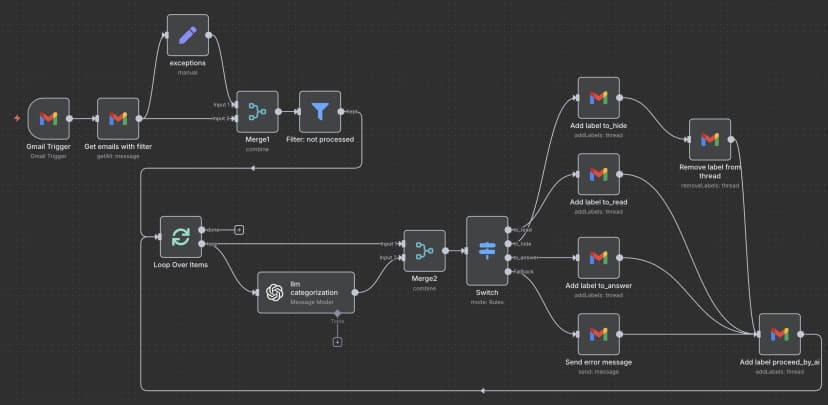
يبدأ سير العمل هذا تلقائيا كلما وصلت رسالة جديدة إلى صندوق Gmail الخاص بي. يلتقط محتوى الرسالة، ويرسله إلى OpenAI لتصنيفها، ثم يضيف وسم Gmail المناسب ويؤرشف الرسائل التي لا تحتاج إلى انتباهي.
العُقد المطلوبة في n8n
ستحتاج إلى هذه العُقد داخل سير العمل:
- Gmail Trigger - يراقب الرسائل الجديدة
- OpenAI Chat Model - يصنف محتوى الرسالة
- Gmail - يضيف الوسوم ويؤرشف الرسائل
- IF conditions - يوجّه الرسائل إلى المسار المناسب بناء على قرار الذكاء الاصطناعي
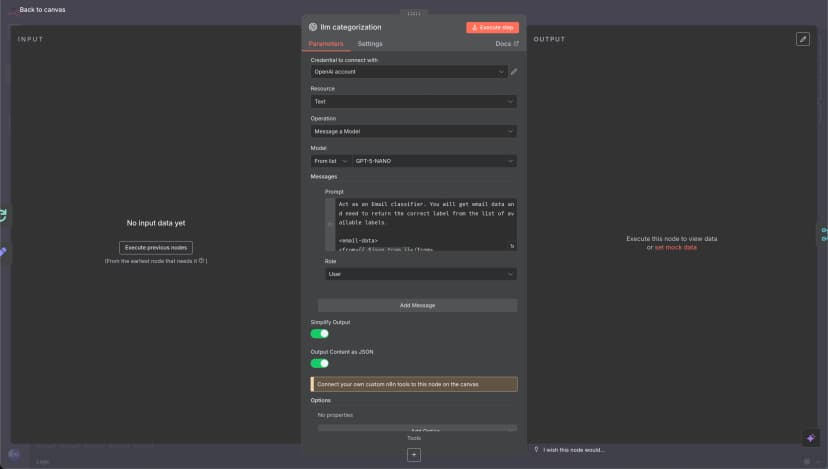
الجزء الأهم هنا هو إعداد عقدة OpenAI. هذا هو الضبط الذي أستخدمه:
الموجّه الذي يجعل النظام يعمل
الموجّه (Prompt) المرسل إلى النموذج هو قلب هذا النظام. وبعد اختبار عشرات الصياغات المختلفة، كانت هذه الصيغة هي الأكثر ثباتا في النتائج:
ملاحظة: هذا مجرد الموجّه الخاص بتصنيف البريد الإلكتروني. إذا كنت تريد سير عمل n8n الكامل، بما في ذلك جميع العُقد والوصلات، فانتقل إلى قسم "ملف JSON الكامل لسير عمل n8n" أدناه.
اضغط لعرض الموجّه الكامل للنموذج
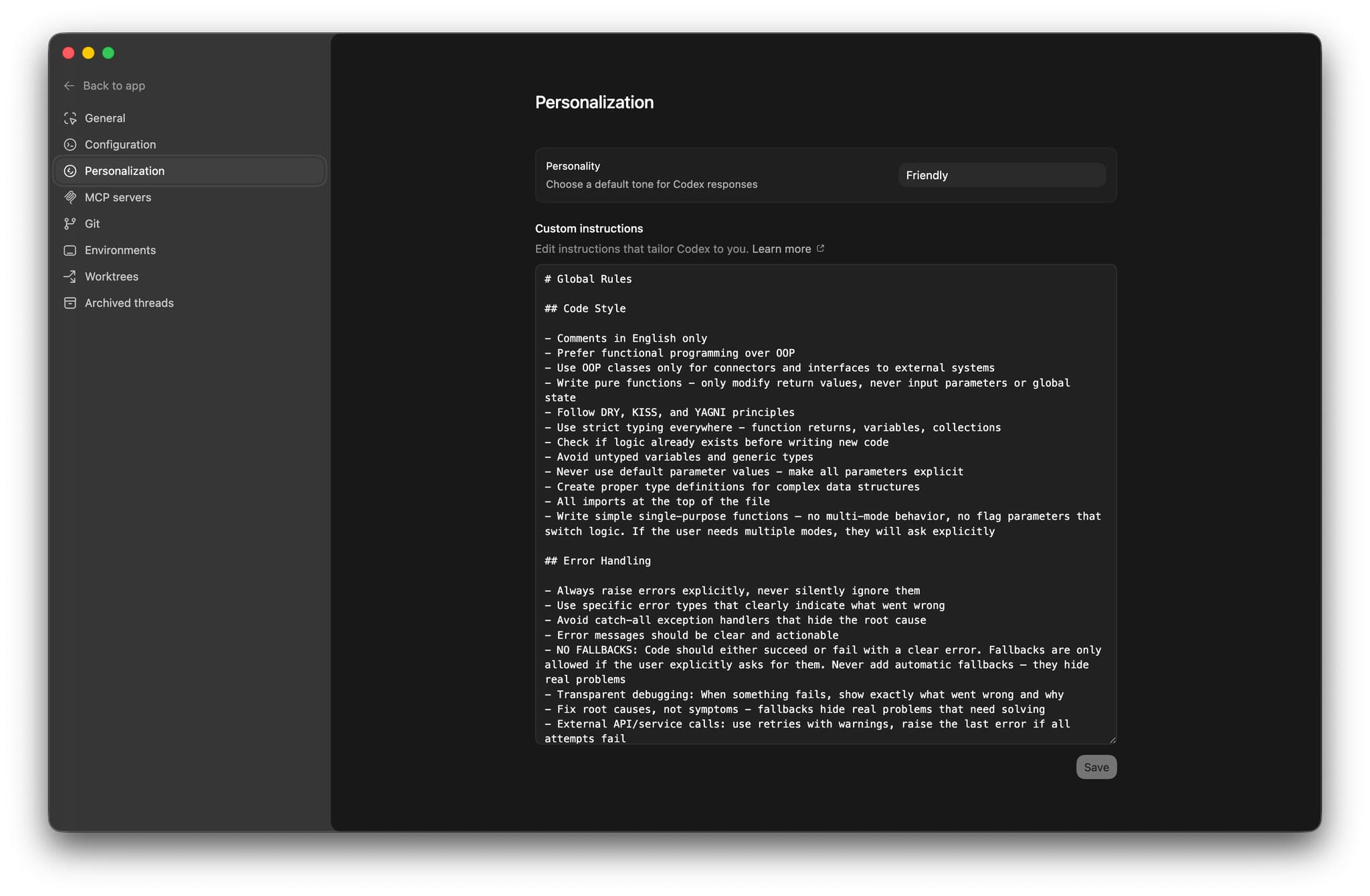
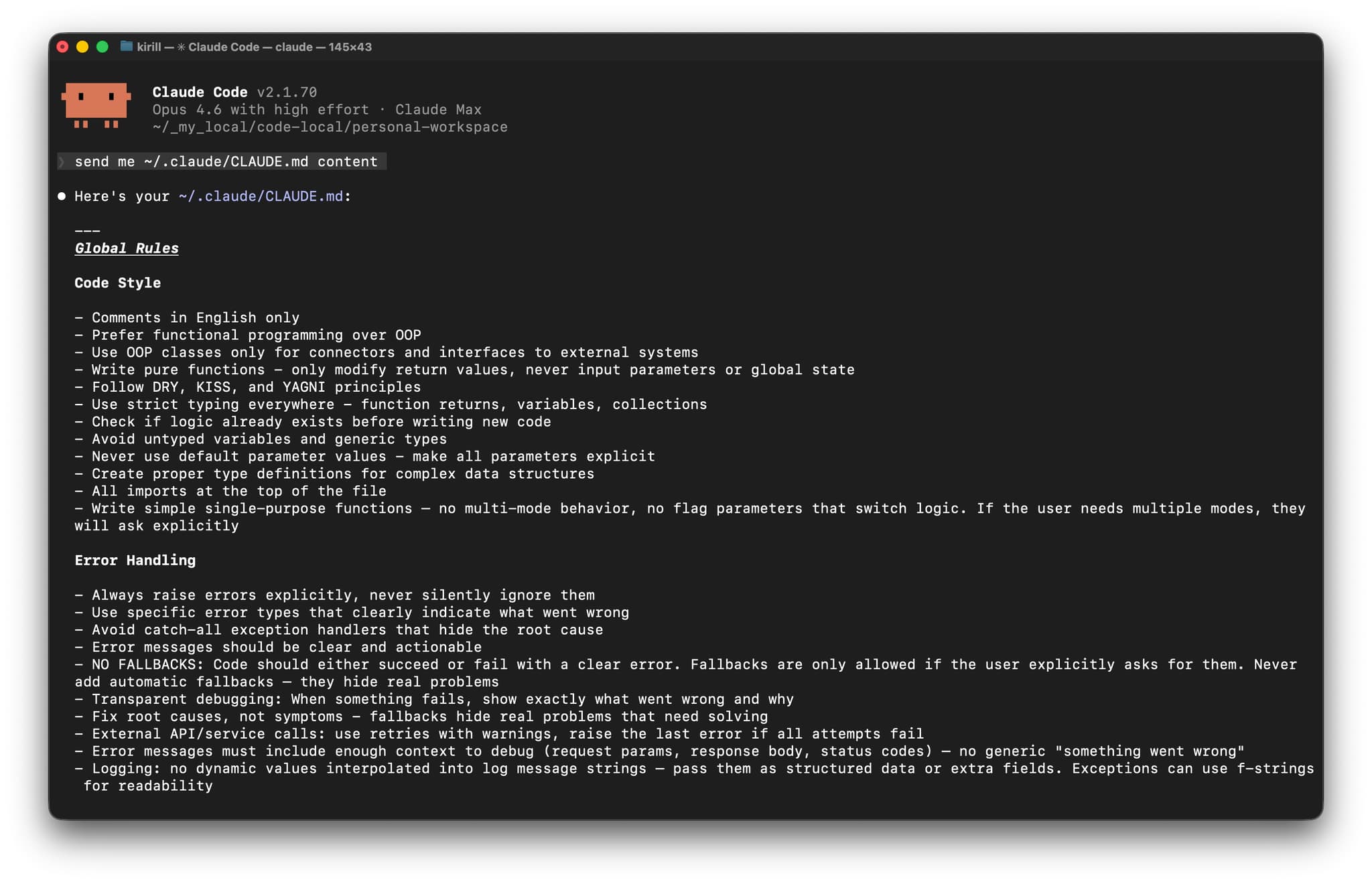
Act as an Email classifier. You will get email data and need to return the correct label from the list of available labels.

<email-data>
<from>{{ $json.From }}</from>
<to>{{ $json.To }}</to>
<email-subject>
{{ $json.Subject }}
</email-subject>
<email-snippet>
{{ $json.snippet }}
</email-snippet>
</email-data>

<possible-labels>

<to_read>
- `to_read` — for emails that need to be read by a human.
<to_read-examples>
- a secret code from the app/service
- notification about a message in another system, Kirill needs to log in and answer
- notification about something important Kirill needs to do
- notification from GitHub about a new message or issue in my project
</to_read-examples>
</to_read>

<to_hide>
- `to_hide` — for emails that are OK to be in the archive, but not needed to be read by a human right now.
<to_hide-examples>
- Invoices
- Some subscription for charity or news
- Product updates
- Advertising
- Proposals from companies without a history of our communications, but do not hide proposals from individuals
- Mentioning me in Discord or Slack (most likely spam and group mentions, or I will see it again in Slack, and no need to see here)
- Slack notification about new messages because Kirill will see them in Slack, no need to see them in email.
- Community summaries
- Some service incidents are mentioned, and an overview
- Notification about one more subscriber, because it does not need action from Kirill, and we can hide it.
- meeting notes from some AI software, because it is OK to have them in the archive, but Kirill doesn't need to reread them now.
</to_hide-examples>
</to_hide>

<to_answer>
- `to_answer` — for emails that need an answer.
<to_answer-examples>
- some emails with questions from a person or a company
</to_answer-examples>
<to_answer-bad-examples>
- message in external system, not in Gmail — bad example because Kirill can not answer via email. We need to mark these emails as to_read.
</to_answer-bad-examples>
</to_answer>

</possible-labels>

{{$node["exceptions"].json["additional-data-for-classify"]}}

Answer in JSON with two fields:
- `reasoning`
- `label`
أستخدم مخرجات منظَّمة لكي أضمن أن يعيد الذكاء الاصطناعي فئة صحيحة في كل مرة. لا أخطاء في تحليل الاستجابة، ولا حالات شاذة يقرر فيها النموذج أن يبتكر تنسيقا غريبا للرد.
نتائج حقيقية بعد ثلاثة أشهر
منذ أن طبقت هذا النظام:
- الوقت الموفَّر: نحو 15 إلى 20 دقيقة يوميا في فرز البريد
- الدقة: الذكاء الاصطناعي يصنف نحو 95% من الرسائل بشكل صحيح
- التكلفة: أقل من 3 دولارات شهريا باستخدام GPT-5-nano
- التصنيفات الخاطئة: ربما رسالتان أو ثلاث رسائل أسبوعيا تُصنف على نحو غير صحيح
نسبة الخطأ البالغة 5% يمكن التعايش معها بسهولة. عندما يخطئ الذكاء الاصطناعي، أنقل الرسالة إلى الفئة الصحيحة وأكمل يومي. وما يزال ذلك أسرع بكثير من فرز كل شيء يدويا.
اعتبارات الأمان والخصوصية ولماذا أتقبل هذا الخيار
نعم، يعالج OpenAI الآن كل رسائلي الشخصية. هذا ليس مثاليا من ناحية الخصوصية، لكنني متصالح معه لعدة أسباب.
أولا، أستخدم بالفعل مدير كلمات مرور مع رموز 2FA لا تعتمد على البريد الإلكتروني، لذلك فإن اختراق البريد وحده ليس كارثيا. ثانيا، OpenAI يعرف عني كثيرا أصلا من استخدامي المعتاد لـChatGPT. ثالثا، توفير الوقت يستحق هذا التنازل في سير عملي الشخصي.
إذا كنت تتعامل مع رسائل عمل حساسة، فربما يكون من الأفضل استخدام نموذج محلي بدلا من OpenAI API. أما إعداد n8n نفسه فيبقى كما هو.
كيف تبدأ ببناء أتمتة البريد الخاصة بك
يمكنك بناء هذا النظام بنفسك عبر الخطوات التالية:
- إعداد n8n - إما على خادمك الخاص أو عبر n8n Cloud
- ربط Gmail - ستحتاج إلى ربط حساب Gmail الخاص بك وتوثيقه
- الوصول إلى OpenAI API - أنشئ حسابا واحصل على مفتاح API الخاص بك
- استيراد سير العمل - استخدم ملف JSON المصدَّر أو النسخة الكاملة الواردة أدناه
- تخصيص الموجّه - عدّل الفئات بما يناسب أنماط بريدك
- الاختبار على عدد قليل من الرسائل - ابدأ على نطاق صغير قبل أتمتة كل شيء
يستغرق الإعداد الكامل نحو 30 دقيقة إذا كنت تعرف n8n جيدا، وربما ساعة إذا كنت تبدأ من الصفر.
لماذا يتفوّق هذا على مزايا Gmail المدمجة
التصنيف التلقائي في Gmail مصمم للجميع، وهذا يعني عمليا أنه لا يناسب أحدا تماما. أما نظامي فهو يتعلم نمط بريدي وتفضيلاتي أنا.
وفوق ذلك، يمكنني تعديل المنطق في أي وقت. تريد إضافة فئة رابعة؟ عدّل الموجّه. تحتاج إلى معاملة مختلفة لرسائل مرسلين محددين؟ أضف عقدة شرطية. قواعد Gmail جامدة، أما هذا النظام فيتكيف مع ما أحتاجه.
الخلاصة
بعد ثلاثة أشهر، أصبح نظام أتمتة البريد هذا جزءا أساسيا من سير عملي اليومي. ليس مثاليا، لكنه أفضل بكثير من فرز مئات الرسائل يدويا كل أسبوع.
الإعداد مباشر، والتكلفة المستمرة منخفضة جدا، وتوفير الوقت حقيقي. إذا كنت غارقا في البريد كما كنت أنا، فقد يكون هذا النهج جديرا بالتجربة.
تذكّر فقط: ابدأ ببساطة، اختبر جيدا، ولا تؤتمت أي شيء لا يمكنك التراجع عنه بسهولة.
ملف JSON الكامل لسير عمل n8n
إذا كنت مستعدا لتطبيق هذا النظام مباشرة، فهذا هو ملف JSON الكامل لسير عمل n8n الذي يمكنك استيراده كما هو:
اضغط لعرض ملف JSON الكامل لسير العمل
{
"name": "email-ai-automation-personal",
"nodes": [
{
"parameters": {
"rules": {
"values": [
{
"conditions": {
"options": {
"caseSensitive": true,
"leftValue": "",
"typeValidation": "strict",
"version": 2
},
"conditions": [
{
"leftValue": "={{ $json.message.content.label }}",
"rightValue": "to_read",
"operator": {
"type": "string",
"operation": "equals"
},
"id": "585b8b65-2369-4f4e-ba0d-4a7dfc7cdef9"
}
],
"combinator": "and"
},
"renameOutput": true,
"outputKey": "to_read"
},
{
"conditions": {
"options": {
"caseSensitive": true,
"leftValue": "",
"typeValidation": "strict",
"version": 2
},
"conditions": [
{
"id": "99e46836-ea2f-41d7-8ebc-24bd5cfadd41",
"leftValue": "={{ $json.message.content.label }}",
"rightValue": "to_hide",
"operator": {
"type": "string",
"operation": "equals",
"name": "filter.operator.equals"
}
}
],
"combinator": "and"
},
"renameOutput": true,
"outputKey": "to_hide"
},
{
"conditions": {
"options": {
"caseSensitive": true,
"leftValue": "",
"typeValidation": "strict",
"version": 2
},
"conditions": [
{
"id": "2a10fb26-99e6-43ab-854c-2d208f701ac3",
"leftValue": "={{ $json.message.content.label }}",
"rightValue": "to_answer",
"operator": {
"type": "string",
"operation": "equals",
"name": "filter.operator.equals"
}
}
],
"combinator": "and"
},
"renameOutput": true,
"outputKey": "to_answer"
}
]
},
"options": {
"fallbackOutput": "extra"
}
},
"type": "n8n-nodes-base.switch",
"typeVersion": 3.2,
"position": [
-1552,
432
],
"id": "ff266540-edd6-42ef-8e07-f1754c1aa394",
"name": "Switch"
},
{
"parameters": {
"options": {}
},
"type": "n8n-nodes-base.splitInBatches",
"typeVersion": 3,
"position": [
-2256,
432
],
"id": "66a72457-b0e5-4ab0-bf49-ef00a06213aa",
"name": "Loop Over Items"
},
{
"parameters": {
"resource": "thread",
"operation": "addLabels",
"threadId": "={{ $json.threadId }}",
"labelIds": []
},
"type": "n8n-nodes-base.gmail",
"typeVersion": 2.1,
"position": [
-1296,
112
],
"id": "47db305c-2f55-4797-b646-331903a798ad",
"name": "Add label to_hide",
"webhookId": "",
"credentials": {}
},
{
"parameters": {
"resource": "thread",
"operation": "addLabels",
"threadId": "={{ $json.threadId }}",
"labelIds": []
},
"type": "n8n-nodes-base.gmail",
"typeVersion": 2.1,
"position": [
-1296,
480
],
"id": "bb1c5387-99a2-42ba-b615-ae65f39e9337",
"name": "Add label to_answer",
"webhookId": "",
"credentials": {}
},
{
"parameters": {
"resource": "thread",
"operation": "addLabels",
"threadId": "={{ $json.threadId }}",
"labelIds": []
},
"type": "n8n-nodes-base.gmail",
"typeVersion": 2.1,
"position": [
-1296,
288
],
"id": "82f68387-c342-4222-87c3-f6bbb1a23f77",
"name": "Add label to_read",
"webhookId": "",
"credentials": {}
},
{
"parameters": {
"resource": "thread",
"operation": "addLabels",
"threadId": "={{ $('Merge2').item.json.threadId }}",
"labelIds": []
},
"type": "n8n-nodes-base.gmail",
"typeVersion": 2.1,
"position": [
-880,
656
],
"id": "7de8f655-3c3d-49f9-9074-b39eaf4abaf2",
"name": "Add label processed_by_ai",
"webhookId": "",
"credentials": {}
},
{
"parameters": {
"resource": "thread",
"operation": "removeLabels",
"threadId": "={{ $('Merge2').item.json.threadId }}",
"labelIds": [
"INBOX"
]
},
"type": "n8n-nodes-base.gmail",
"typeVersion": 2.1,
"position": [
-1040,
208
],
"id": "438c1618-edf3-41a1-b991-fef18b003edf",
"name": "Remove label from thread",
"webhookId": "",
"credentials": {}
},
{
"parameters": {
"pollTimes": {
"item": [
{
"mode": "everyX"
}
]
},
"filters": {}
},
"type": "n8n-nodes-base.gmailTrigger",
"typeVersion": 1.2,
"position": [
-2560,
160
],
"id": "676e065d-fc0b-4ae4-8c1b-4b663267023f",
"name": "Gmail Trigger",
"credentials": {}
},
{
"parameters": {
"assignments": {
"assignments": [
{
"id": "be8e84b9-48af-4a49-b4f7-797382c13afe",
"name": "additional-data-for-classify",
"value": "<additional-data-for-classify>\n- All messages from Deel with the main idea, like `New contractor submission`, please mark as `to_hide`.\n</additional-data-for-classify>",
"type": "string"
}
]
},
"options": {}
},
"type": "n8n-nodes-base.set",
"typeVersion": 3.4,
"position": [
-2240,
-32
],
"id": "9cb4e14e-cd43-4a7b-96c9-7acd93b8b947",
"name": "exceptions"
},
{
"parameters": {
"modelId": {
"__rl": true,
"value": "gpt-5-mini",
"mode": "list",
"cachedResultName": "GPT-5-MINI"
},
"messages": {
"values": [
{
"content": "=Act as an Email classifier. You will get email data and need to return the correct label from the list of available labels.\n\n<email-data>\n<from>{{ $json.From }}</from>\n<to>{{ $json.To }}</to>\n<email-subject>\n{{ $json.Subject }}\n</email-subject>\n<email-snippet>\n{{ $json.snippet }}\n</email-snippet>\n</email-data>\n\n<possible-lables>\n\n<to_read>\n- `to_read` — for emails that need to be read by a human. \n<to_read-examples>\n- a secret code from the app/service\n- notification about a message in another system, Kirill needs to log in and answer\n- notification about something important Kirill needs to do\n- notification from GitHub about a new message or issue in my project\n</to_read-examples>\n</to_read>\n\n<to_hide>\n- `to_hide` — for emails that are OK to be in the archive, but not needed to be read by a human right now. \n<to_hide-examples> \n- Invoices \n- Some subscription for charity or news\n- Product uddates\n- Advertising\n- Proposals from companies without a history of our communications, but do not hide proposals from individuals\n- Mentioning me in Discord or Slack (most likely spam and group mentions, or I will see it again in Slack, and no need to see here)\n- Slack notification about new messages because Kirill will see them in Slack, no need to see them in email.\n- Community summaries\n- Some service incidents are mentioned, and an overview\n- Notification about one more subscriber, because it does not need action from Kirill, and we can hide it.\n- meeting notes from some AI software, because it is OK to have them in the archive, but Kirill doesn't need to reread them now.\n</to_hide-examples>\n</to_hide>\n\n<to_answer>\n- `to_answer` — for emails that need an answer.\n<to_answer-examples>\n- some emails with questions from a person or a company\n</to_answer-examples>\n<to_answer-bad-examples>\n- message in external system, not in Gmail — bad example because Kirill can not answer via email. We need to mark these emails as to_read.\n</to_answer-bad-examples>\n</to_answer>\n\n</possible-lables>\n\n{{$node[\"exceptions\"].json[\"additional-data-for-classify\"]}}\n\nAnswer in JSON with two fields:\n- `reasoning`\n- `label`"
}
]
},
"jsonOutput": true,
"options": {}
},
"type": "@n8n/n8n-nodes-langchain.openAi",
"typeVersion": 1.8,
"position": [
-2032,
560
],
"id": "4f65ce04-67eb-4c28-9d56-6d2f03dedd41",
"name": "llm categorization",
"alwaysOutputData": false,
"credentials": {}
},
{
"parameters": {
"conditions": {
"options": {
"caseSensitive": true,
"leftValue": "",
"typeValidation": "strict",
"version": 2
},
"conditions": [
{
"id": "95f8838a-df88-496c-a0ea-d19c612eb81b",
"leftValue": "={{ $json.labels.filter(item => item.id == \"__REPLACE_WITH_YOUR_PROCESSED_LABEL_ID__\") }}",
"rightValue": "={{ \"\" }}",
"operator": {
"type": "array",
"operation": "empty",
"singleValue": true
}
}
],
"combinator": "and"
},
"options": {}
},
"type": "n8n-nodes-base.filter",
"typeVersion": 2.2,
"position": [
-1936,
144
],
"id": "cc8dda5a-414c-4fb8-9774-6bdfe1224976",
"name": "Filter: not processed"
},
{
"parameters": {
"sendTo": "",
"subject": "There is a problem with AI email workflow — AI choose the wrong option",
"emailType": "text",
"message": "!",
"options": {}
},
"type": "n8n-nodes-base.gmail",
"typeVersion": 2.1,
"position": [
-1296,
656
],
"id": "90cfc5e9-cddd-418e-bf95-5e9eb77b6778",
"name": "Send error message",
"webhookId": "",
"credentials": {}
},
{
"parameters": {
"operation": "getAll",
"returnAll": true,
"filters": {
"q": "=label:INBOX -label:__REPLACE_WITH_YOUR_PROCESSED_LABEL_ID__ after:2025/06/15"
}
},
"type": "n8n-nodes-base.gmail",
"typeVersion": 2.1,
"position": [
-2400,
160
],
"id": "5d534d0c-0210-4d32-853d-d26a5b13c646",
"name": "Get emails with filter",
"webhookId": "",
"credentials": {}
},
{
"parameters": {
"mode": "combine",
"combineBy": "combineByPosition",
"options": {}
},
"type": "n8n-nodes-base.merge",
"typeVersion": 3.2,
"position": [
-2080,
144
],
"id": "c6e6b5bd-0196-4a4f-a36d-1f119df3ee5d",
"name": "Merge1"
},
{
"parameters": {
"mode": "combine",
"combineBy": "combineByPosition",
"options": {}
},
"type": "n8n-nodes-base.merge",
"typeVersion": 3.2,
"position": [
-1696,
464
],
"id": "d109e9f9-1089-4060-89e4-e70762d0aea5",
"name": "Merge2"
}
],
"pinData": {},
"connections": {
"Switch": {
"main": [
[
{
"node": "Add label to_read",
"type": "main",
"index": 0
}
],
[
{
"node": "Add label to_hide",
"type": "main",
"index": 0
}
],
[
{
"node": "Add label to_answer",
"type": "main",
"index": 0
}
],
[
{
"node": "Send error message",
"type": "main",
"index": 0
}
]
]
},
"Loop Over Items": {
"main": [
[],
[
{
"node": "llm categorization",
"type": "main",
"index": 0
},
{
"node": "Merge2",
"type": "main",
"index": 0
}
]
]
},
"Add label to_hide": {
"main": [
[
{
"node": "Remove label from thread",
"type": "main",
"index": 0
}
]
]
},
"Add label to_answer": {
"main": [
[
{
"node": "Add label processed_by_ai",
"type": "main",
"index": 0
}
]
]
},
"Add label to_read": {
"main": [
[
{
"node": "Add label processed_by_ai",
"type": "main",
"index": 0
}
]
]
},
"Add label processed_by_ai": {
"main": [
[
{
"node": "Loop Over Items",
"type": "main",
"index": 0
}
]
]
},
"Remove label from thread": {
"main": [
[
{
"node": "Add label processed_by_ai",
"type": "main",
"index": 0
}
]
]
},
"Gmail Trigger": {
"main": [
[
{
"node": "Get emails with filter",
"type": "main",
"index": 0
}
]
]
},
"exceptions": {
"main": [
[
{
"node": "Merge1",
"type": "main",
"index": 0
}
]
]
},
"llm categorization": {
"main": [
[
{
"node": "Merge2",
"type": "main",
"index": 1
}
]
]
},
"Filter: not processed": {
"main": [
[
{
"node": "Loop Over Items",
"type": "main",
"index": 0
}
]
]
},
"Send error message": {
"main": [
[
{
"node": "Add label processed_by_ai",
"type": "main",
"index": 0
}
]
]
},
"Get emails with filter": {
"main": [
[
{
"node": "exceptions",
"type": "main",
"index": 0
},
{
"node": "Merge1",
"type": "main",
"index": 1
}
]
]
},
"Merge1": {
"main": [
[
{
"node": "Filter: not processed",
"type": "main",
"index": 0
}
]
]
},
"Merge2": {
"main": [
[
{
"node": "Switch",
"type": "main",
"index": 0
}
]
]
}
},
"active": true,
"settings": {
"executionOrder": "v1",
"callerPolicy": "workflowsFromSameOwner"
},
"versionId": "",
"meta": {
"templateCredsSetupCompleted": true,
"instanceId": ""
},
"id": "",
"tags": []
}
تعليمات الاستيراد
- انسخ ملف JSON أعلاه
- احفظه في ملف باسم
email-ai-automation-personal.json - في n8n، انتقل إلى Workflows → Import from JSON
- اختر الملف الذي حفظته ثم اضغط Import
- اضبط بيانات اعتماد Gmail وOpenAI
- استبدل
__REPLACE_WITH_YOUR_PROCESSED_LABEL_ID__بمعرف الوسم الذي تريد استخدامه للرسائل المعالجة - جهّز رسالة البريد التي ستُرسل إذا وقع خطأ
- اختبر على عدد قليل من الرسائل قبل تفعيل المشغّل
تذكر أيضا تحديث مفتاح OpenAI API وإعداد مصادقة Gmail بعد استيراد سير العمل.
شرح بالفيديو: الإعداد الكامل لأتمتة البريد الإلكتروني
إذا كنت تفضل التعلم بصريا، فقد أعددت دليلا بالفيديو يشرح العملية كاملة لإعداد نظام أتمتة البريد هذا:
يعرض الفيديو كل خطوة من إنشاء سير عمل n8n، وضبط تكامل OpenAI، وإعداد اتصالات Gmail، واختبار الأتمتة كاملة. سترى إعدادات العُقد كما هي، وصياغة الطلب المرسلة إلى النموذج أثناء التشغيل، وكيف يصنف النظام رسائل حقيقية في الوقت الفعلي.