تحسن Claude Code كثيرًا بالنسبة لي حين توقفت عن إعادة شرح نفسي في كل محادثة. أبرمج بمساعدة الذكاء الاصطناعي منذ نحو عامين، وأستخدم Claude Code منذ قرابة ستة أشهر، وكان أكثر ما أفادني شيئًا بسيطًا إلى حد يكاد يحرجني: أن أضع قواعدي الافتراضية في ~/.claude/CLAUDE.md وأجعل Claude يبدأ منها.
قبل ذلك، كنت أستنزف الرسائل في التذكير بالأشياء نفسها. استخدم أنواعًا صارمة. لا تضف بدائل احتياطية لم أطلبها. اجعل التغييرات محدودة. لا تعد كتابة نصف الملف لأنك اندفعت أكثر من اللازم. كان Claude يلتزم في الغالب، لكنني كنت أدفع هذه الكلفة مرة بعد مرة.
الآن صار هذا الأساس حاضرًا سلفًا قبل أن يدخل المستودع أصلًا في الحديث.
أين أحتفظ بتعليمات Claude Code العامة
تقسم وثائق Claude Code من Anthropic هذه التعليمات إلى عدة طبقات. ~/.claude/CLAUDE.md هو الملف العام على مستوى المستخدم. أما ./CLAUDE.md أو ./.claude/CLAUDE.md فهما طبقة المشروع المشتركة. وCLAUDE.local.md مخصص لملاحظاتي الشخصية عن المشروع التي ينبغي أن تبقى خارج git.
وهذا يطابق تقريبًا ما أريده:
~/.claude/CLAUDE.mdلتفضيلاتي البرمجية الدائمةCLAUDE.mdالخاص بالمشروع للهندسة والأوامر الخاصة بالمستودعCLAUDE.local.mdعندما أحتاج إلى ملاحظات شخصية تخص المشروع ويجب أن تبقى خارجgit
لا أريد أن أكرر القواعد الشخصية نفسها في كل مستودع أفتحه. إذا كان "عدم إضافة بدائل احتياطية صامتة" تفضيلًا عامًا، فمكانه الملف العام. أما إذا كان "شغّل هذا الأمر الداخلي الغريب قبل الاختبارات" شيئًا خاصًا بمستودع بعينه، فمكانه ملف المشروع.
وهذه هي النسخة التي أستخدمها حاليًا في Claude Code:

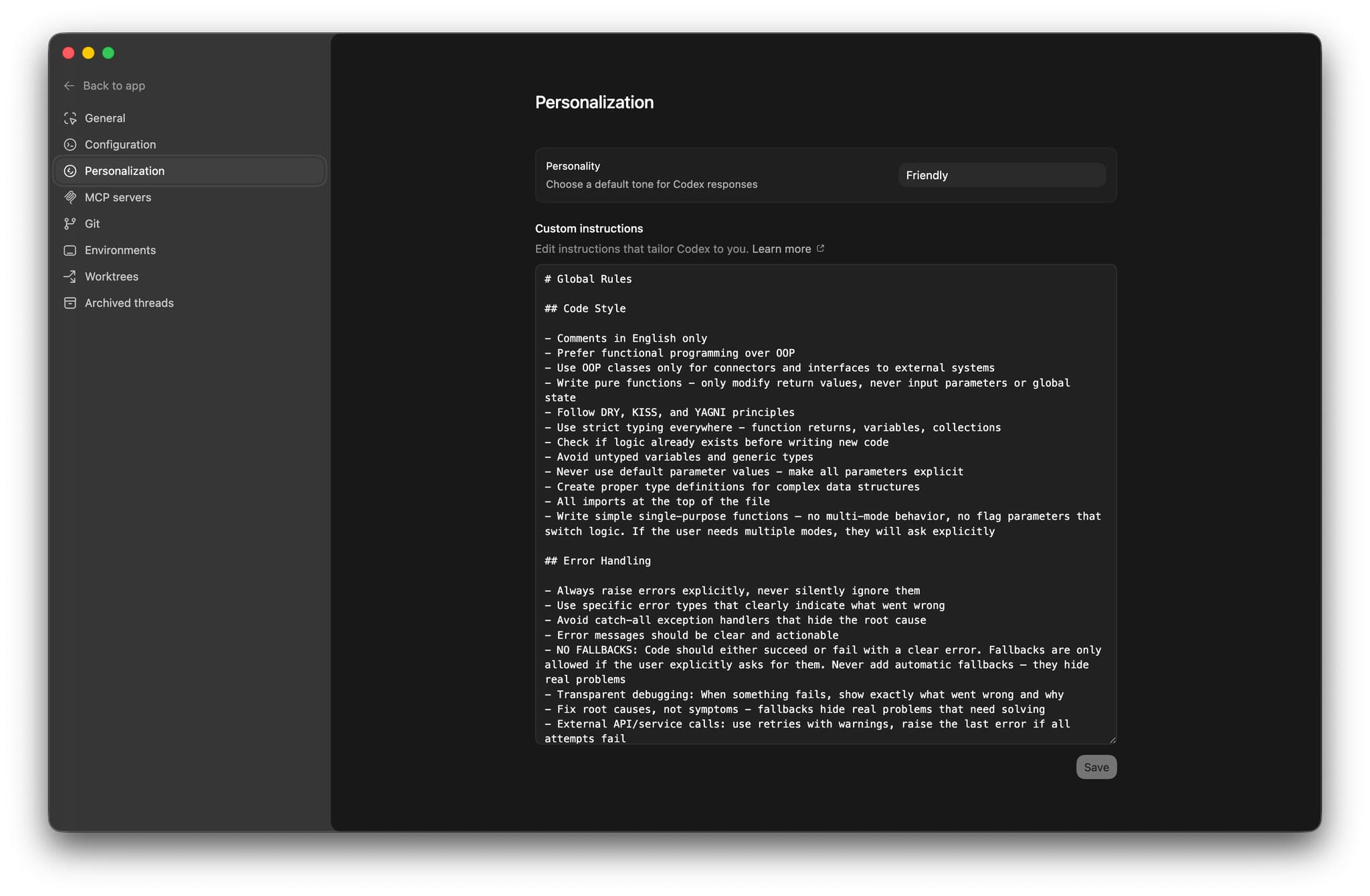
قواعد Claude Code التي أستخدمها فعلًا
هذا المقطع ممل عن قصد. وغالبًا هذا ما تكون عليه القواعد الجيدة. أنا لا أحاول وصف كل حالة طرفية مسبقًا، بل أريد فقط أن يتوقف Claude Code عن تكرار الأخطاء المتوقعة نفسها.
# Global Rules

## Code Style

- Comments in English only
- Prefer functional programming over OOP
- Use OOP classes only for connectors and interfaces to external systems
- Write pure functions - only modify return values, never input parameters or global state
- Follow DRY, KISS, and YAGNI principles
- Prefer simple, native, vendor-recommended solutions and avoid premature abstractions
- Use strict typing for returns, variables, collections, and complex data; validate external/API data at runtime; require needed fields, ignore unrelated extra fields, prefer structured models over loose dictionaries, and avoid weak generic types like `Any`, `unknown`, or `List[Dict[str, Any]]`
- Check if logic already exists before writing new code
- Never use default parameter values - make all parameters explicit
- Write simple single-purpose functions - no multi-mode behavior, no flag parameters that switch logic. If the user needs multiple modes, they will ask explicitly

## Error Handling

- Always raise errors explicitly, never silently ignore them
- Use specific error types that clearly indicate what went wrong
- Avoid catch-all exception handlers that hide the root cause
- No fallbacks, symptom-masking guards, or silent recovery unless I explicitly ask for them; fix root causes and make code either succeed or fail with a clear error
- External API or service calls: use retries with warnings, then raise the last error
- Error messages must be clear, actionable, and specific: explain what failed and why, include request params, response body, status codes, and avoid generic "something went wrong"
- Logging should use structured fields instead of interpolating dynamic values into message strings

## Libraries and Dependencies

- Use modern stable, project-compatible package management, libraries, and language standards; prefer vendor-recommended patterns such as ESM when supported
- Install dependencies in project environments, not globally
- Add or update dependencies in project config files, not as one-off manual installs
- If a dependency is installed locally, read its source code when needed instead of guessing, even if it is gitignored

## Testing

- Respect the repository test strategy and add only the minimum useful tests for the requested change
- Prefer smoke, integration, and end-to-end tests over narrow unit or regression tests; do not test static text, prompts, or config unless behavior depends on them
- Do not create fake/mock-based tests by default; use real integrations when practical, even if they cost a little money
- UI tests and automations must use stable IDs, test IDs, or accessibility IDs instead of visible text, and fail fast without fallback clicks

## Terminal Usage

- Prefer non-interactive commands with flags over interactive ones
- Always use non-interactive git diff: `git --no-pager diff` or `git diff | cat`

## Workflow

- Read the existing code and relevant project instructions before editing
- Keep changes minimal and tightly scoped to the current request: make the smallest useful diff, change only the lines needed to solve the problem, and avoid unrelated improvements unless the user asks for them
- Match the existing style of the repository even if it differs from my personal preference; new code must look like it was written by the same author
- Keep files small and cohesive; split by feature or responsibility when the project has no established structure
- Do not revert unrelated changes
- If you are unsure, inspect the codebase instead of inventing patterns
- When project instructions include test or lint commands, run them before finishing if the task changed code

## Documentation

- Code is the primary documentation - use clear naming, types, and docstrings
- Keep documentation in docstrings of the functions, classes, or modules they describe, not in separate files
- Separate docs files only when a concept cannot be expressed clearly in code, and only one file per topic
- Never duplicate documentation across files; reference other sources instead
- Store knowledge as current state, not as a changelog of modifications

## Commits

- Never create a git commit unless the user explicitly asks for one
- Prefer `git merge` over `git squash` whenever possible, unless the user explicitly asks for squash.
- Uncommitted changes are the user's review state - they read the diff before deciding what to commit
- Keep changes uncommitted until asked, so the diff stays clean and reviewable
هذا المقطع يغطي معظم ما يهمني في العمل اليومي.
ومن دونه، ينحرف Claude بطرق مألوفة جدًا. يضيف سلوكًا احتياطيًا "على سبيل الاحتياط". يوسّع الأنواع لأن الصرامة النوعية تبدو له مزعجة. يلف الدوال البسيطة بطبقات إضافية. ويصلح المشكلة الخطأ لأنه يحاول أن يكون متعاونًا أكثر مما ينبغي بدل أن يكون دقيقًا.
وأنا أفضل أن أقضي عشر دقائق مرة واحدة في كتابة ملف عام جيد، بدلًا من الاستمرار في تصحيح هذه الأنماط واحدًا واحدًا في كل جلسة جديدة.
أولًا CLAUDE.md العام، ثم CLAUDE.md الخاص بالمشروع
لا أريد ملف CLAUDE.md واحدًا ضخمًا محشوًا بكل شيء.
يجب أن يجيب الملف العام عن أسئلة مثل:
- إلى أي حد أريد صرامة الأنواع؟
- كيف أريد التعامل مع الأخطاء؟
- هل أريد تغييرات محدودة أم إعادة هيكلة واسعة؟
- ما نوع التوثيق الذي أتوقعه؟
أما ملف المشروع، فينبغي أن يجيب عن أسئلة مختلفة:
- كيف أشغّل المشروع؟
- ما الأوامر الآمنة والمتوقعة؟
- ما أهم حدود الهندسة؟
- أين توجد الاختبارات؟
- ما الأعراف الخاصة بهذا المستودع فقط؟
عمليًا:
- ملف
CLAUDE.mdالعام يشرح كيف أعمل أنا - ملف
CLAUDE.mdالخاص بالمشروع يشرح كيف يعمل هذا المستودع
وعندما يختلط هذان المستويان، يتحول الملف إلى كتلة مشوشة. نصفه عام أكثر من اللازم، ونصفه محلي أكثر من اللازم، ويضطر Claude إلى حمل كل ذلك معه في كل مهمة.
وتوصي Anthropic أيضًا بأن تبقى هذه الملفات موجزة. وهذا ممتاز. فملفات التعليمات الطويلة تبدو غالبًا كأن أحدهم حاول حشر دليل هندسي كامل داخل الموجّه، وهذا لا ينتهي جيدًا أبدًا.
ما الذي ينكسر في منتصف الجلسة
القواعد تساعد، لكنها لا تنقذ جلسة فوضوية إلى الأبد.
إذا قضيت عشرين رسالة وأنا أناقش نظامًا فرعيًا واحدًا ثم انتقلت فجأة إلى مشكلة مختلفة تمامًا، فقد يبقى Claude عالقًا ذهنيًا في الإطار السابق. وهذا طبيعي. أنا لا أتعامل مع المحادثات الطويلة على أنها شيء مقدس.
لذلك عمليًا أفعل هذا:
- أبدأ جلسة جديدة عندما تنتقل المهمة من الاستكشاف إلى التنفيذ
- أبدأ جلسة جديدة عند الانتقال من نظام فرعي إلى آخر مختلف جدًا
- أبقي تعليمات المشروع موجزة بما يكفي حتى لا أتحمل عبء السياق في كل جولة
ولهذا أيضًا أحب ملفات markdown للخطط والملاحظات. فإذا كانت المهمة كبيرة، فأنا أفضل حفظ الحالة بشكل صريح بدل أن أثق في أن سلسلة محادثة طويلة ستبقى نظيفة.
طريقتي العملية لتطبيق قواعد Claude Code
لو كنت سأبدأ من الصفر اليوم، لفعلت ذلك بهذا الترتيب.
1. أنشئ ~/.claude/CLAUDE.md
ابدأ بما لا يقبل التفاوض. لا نصائح حياتية، ولا بيانات مطولة عن فلسفة الهندسة. فقط القواعد التي تتكرر أهميتها عبر المستودعات.
بالنسبة لي، هذا يعني:
- أنواع صارمة
- معالجة أخطاء صريحة
- تعديلات محدودة
- عدم وجود بدائل احتياطية صامتة
- سلاسل توثيق في المواضع التي ينبغي أن يكون فيها التوثيق
- عادات طرفية غير تفاعلية
وهذا وحده يغيّر المخرجات أكثر من معظم الحيل المتعلقة بصياغة الموجّه.
2. أضف CLAUDE.md للمشروع
استخدم ملف المستودع للأوامر والهندسة والتسمية والحدود. تمنحك Anthropic الأمر /init لصياغة مسودة أولية، وهذا مفيد. لكنني أعدله يدويًا بعد ذلك دائمًا، لأن التعليمات المولدة مجرد مسودة وليست نسخة نهائية.
3. أبقِ قواعد المشروع قصيرة
لا تحوّل ملف المشروع إلى نسخة ثانية من ملفك الشخصي. ضع فيه الأوامر الخاصة بالمستودع، وملاحظات الهندسة، والأعراف المحلية. واترك تفضيلاتك الدائمة في الملف العام.
لماذا هذا أهم من براعة صياغة الموجّه
الكثير من محتوى "الإعداد النهائي" عن أدوات البرمجة بالذكاء الاصطناعي ينزلق سريعًا إلى ما يشبه الاستعراض.
ما حسّن عملي اليومي فعلًا كان أبسط بكثير:
- ملف
CLAUDE.mdعام وثابت على مستوى المستخدم - ملف
CLAUDE.mdخاص بالمشروع وواضح
هذا الترتيب يجعل Claude أكثر هدوءًا. بدائل احتياطية عشوائية أقل. وتجريدات متكلَّفة أقل. وجلسات أقل أكتشف فيها بعد عشر دقائق أنني وClaude كنا نعالج مشكلتين مختلفتين قليلًا.
إذا كنت تستخدم أكثر من أداة للبرمجة بالذكاء الاصطناعي، فسترى النمط نفسه في أماكن أخرى أيضًا. منتج مختلف، والدرس نفسه: اضبط الأساس مرة واحدة، وتوقف عن إعادة التفاوض عليه كل صباح.
إذا أردت قراءة المقالات المرافقة، فستجدها هنا:
- قواعد Cursor IDE للذكاء الاصطناعي: https://kirill-markin.com/ar/maqalat/qawaid-cursor-ide-lilthakaa-alistinaei-tahseen-barmaja/
- قواعد Codex للذكاء الاصطناعي: https://kirill-markin.com/ar/maqalat/qawaid-codex-lilthakaa-alistinaei/