मैं इस इंतज़ार से ऊब चुका था कि Gmail खुद समझे कि मेरे लिए कौन-से ईमेल सचमुच मायने रखते हैं। तीन महीने तक AI से अपने निजी ईमेल छंटवाने के बाद अब हाथ से छंटाई पर लौटने की कल्पना भी मुश्किल लगती है।
मेरा तरीका जितना असरदार है, उतना ही सीधा भी है: GPT-5-nano हर ईमेल को सिर्फ तीन में से एक श्रेणी में डाल देता है। संग्रहित करें, पढ़ें, या जवाब दें। बस।
पूरा सेटअप n8n पर चलता है और इसकी लागत लगभग न के बराबर है, क्योंकि मैं OpenAI का सबसे सस्ता मॉडल इस्तेमाल करता हूं और उससे जवाब तयशुदा JSON ढांचे में मंगवाता हूं। हां, इसका मतलब है कि OpenAI मेरे निजी ईमेल संसाधित करता है, लेकिन सच कहूं तो उसे शायद मेरी ChatGPT बातचीत से ही मेरे बारे में काफी कुछ पहले से पता है।
यह कोई सैद्धांतिक विचार भर नहीं है। मैं इसे तीन महीने से अपने रोज़मर्रा के कामकाज में चला रहा हूं, और यह हर हफ्ते मेरे कई घंटे बचाता है।
मैंने यह ईमेल स्वचालन प्रणाली क्यों बनाई
मुझे जरूरत से कहीं ज्यादा ईमेल मिलते हैं। न्यूज़लेटर, अलग-अलग सेवाओं की सूचनाएं, और असली लोगों के ज़रूरी संदेश, सब कुछ एक ही इनबॉक्स में आकर जमा हो जाता है। Gmail की बनी-बनाई छंटाई बार-बार साफ पैटर्न पकड़ने से चूक रही थी, और मैं हर सुबह करीब 20 मिनट सिर्फ यह तय करने में लगा देता था कि क्या पढ़ना है।
फैसला तब हुआ जब मुझे एहसास हुआ कि मैं अपने 80% ईमेल बिना पढ़े ही संग्रहित कर देता हूं। अगर ज्यादातर ईमेल को मेरे ध्यान की जरूरत ही नहीं है, तो फिर यह तय मैं ही क्यों करूं कि किन पर ध्यान देना है?
अगर आप वीडियो में देखना पसंद करते हैं: मैंने इस पूरी व्यवस्था का चरण-दर-चरण वीडियो प्रदर्शन भी बनाया है। n8n और LLM के साथ ईमेल स्वचालन का यह वीडियो ट्यूटोरियल देखें और पूरा सेटअप चलते हुए समझें।

तीन श्रेणियों वाला तरीका जो सचमुच काम करता है
यह मॉडल हर ईमेल को ठीक तीन विकल्पों में से एक में रखता है:
- संग्रहित करें - वे न्यूज़लेटर जिनकी सदस्यता तो ली है लेकिन मैं उन्हें पढ़ता नहीं, स्वचालित सूचनाएं, और प्रचार वाले ईमेल
- पढ़ें - ऐसी सामग्री जिसे मैं पढ़ना चाहता हूं, लेकिन जिसका जवाब देना जरूरी नहीं
- जवाब दें - ऐसे ईमेल जिनका जवाब मुझे खुद देना है
अंदरूनी तौर पर यह कार्यप्रवाह to_hide, to_read, और to_answer जैसे सिस्टम लेबल इस्तेमाल करता है, लेकिन पाठक के लिए इनका अर्थ यही तीन फैसले हैं।
कोई जटिल फ़ोल्डर संरचना नहीं। कोई प्राथमिकता स्तर नहीं। सिर्फ तीन सीधे फैसले, जो मेरे लगभग सारे ईमेल संभाल लेते हैं।
n8n में कार्यप्रवाह कैसे सेट करें
यह पूरा n8n कार्यप्रवाह है, जो सब कुछ अपने-आप संभालता है:
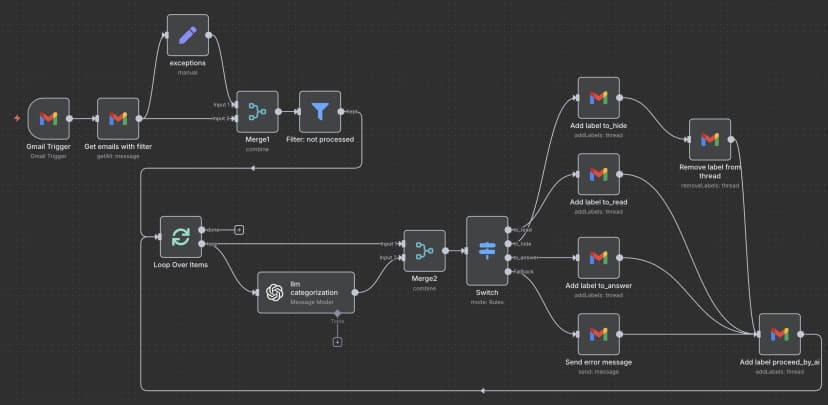
मेरे Gmail इनबॉक्स में नया ईमेल आते ही यह कार्यप्रवाह चल पड़ता है। यह ईमेल की सामग्री उठाता है, वर्गीकरण के लिए OpenAI को भेजता है, फिर सही Gmail लेबल लगाता है और जिन ईमेल पर मुझे ध्यान नहीं देना, उन्हें संग्रहित कर देता है।
ज़रूरी n8n नोड्स
अपने कार्यप्रवाह में आपको ये नोड जोड़ने होंगे:
- Gmail Trigger - नए ईमेल पर नज़र रखता है
- OpenAI Chat Model - ईमेल की सामग्री का वर्गीकरण करता है
- Gmail - लेबल लगाता है और ईमेल संग्रहित करता है
- IF conditions - AI के फैसले के हिसाब से ईमेल को अलग रास्ते पर भेजता है
असल जादू OpenAI नोड की सेटिंग में है। मैं इसे इस तरह भरता हूं:
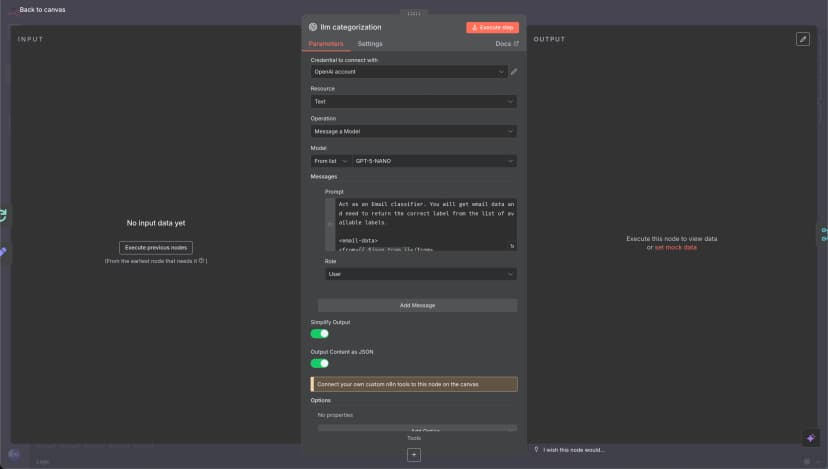
वह LLM प्रॉम्प्ट जो इसे सही चलाता है
यह प्रॉम्प्ट इस पूरे सिस्टम का दिल है। दर्जनों अलग-अलग रूप आजमाने के बाद मुझे यही संस्करण सबसे लगातार सही नतीजे देता है:
नोट: यह सिर्फ ईमेल वर्गीकरण के लिए LLM प्रॉम्प्ट है। अगर आप सभी नोड और उनके कनेक्शन सहित पूरा n8n कार्यप्रवाह देखना चाहते हैं, तो नीचे "पूरा n8n कार्यप्रवाह JSON" अनुभाग तक जाएं।
पूरा LLM प्रॉम्प्ट देखने के लिए क्लिक करें
Act as an Email classifier. You will get email data and need to return the correct label from the list of available labels.

<email-data>
<from>{{ $json.From }}</from>
<to>{{ $json.To }}</to>
<email-subject>
{{ $json.Subject }}
</email-subject>
<email-snippet>
{{ $json.snippet }}
</email-snippet>
</email-data>

<possible-labels>

<to_read>
- `to_read` — for emails that need to be read by a human.
<to_read-examples>
- a secret code from the app/service
- notification about a message in another system, Kirill needs to log in and answer
- notification about something important Kirill needs to do
- notification from GitHub about a new message or issue in my project
</to_read-examples>
</to_read>

<to_hide>
- `to_hide` — for emails that are OK to be in the archive, but not needed to be read by a human right now.
<to_hide-examples>
- Invoices
- Some subscription for charity or news
- Product updates
- Advertising
- Proposals from companies without a history of our communications, but do not hide proposals from individuals
- Mentioning me in Discord or Slack (most likely spam and group mentions, or I will see it again in Slack, and no need to see here)
- Slack notification about new messages because Kirill will see them in Slack, no need to see them in email.
- Community summaries
- Some service incidents are mentioned, and an overview
- Notification about one more subscriber, because it does not need action from Kirill, and we can hide it.
- meeting notes from some AI software, because it is OK to have them in the archive, but Kirill doesn't need to reread them now.
</to_hide-examples>
</to_hide>

<to_answer>
- `to_answer` — for emails that need an answer.
<to_answer-examples>
- some emails with questions from a person or a company
</to_answer-examples>
<to_answer-bad-examples>
- message in external system, not in Gmail — bad example because Kirill can not answer via email. We need to mark these emails as to_read.
</to_answer-bad-examples>
</to_answer>

</possible-labels>

{{$node["exceptions"].json["additional-data-for-classify"]}}

Answer in JSON with two fields:
- `reasoning`
- `label`
मैं AI से जवाब तयशुदा JSON रूप में मंगवाता हूं, ताकि हर बार मान्य श्रेणी ही मिले। इससे जवाब को संभालने में तकनीकी गड़बड़ियां नहीं होतीं और मॉडल भी उत्तर का प्रारूप अपनी तरफ से बदलने नहीं लगता।
तीन महीनों के वास्तविक नतीजे
इस सिस्टम को लागू करने के बाद:
- समय की बचत: ईमेल छंटाई में रोज़ लगभग 15-20 मिनट बचते हैं
- सटीकता: मॉडल करीब 95% ईमेल सही तरह वर्गीकृत करता है
- लागत: GPT-5-nano के साथ महीने के $3 से भी कम
- गलत वर्गीकरण: हफ्ते में शायद 2-3 ईमेल गलत श्रेणी में चले जाते हैं
5% की त्रुटि दर मेरे लिए पूरी तरह संभालने लायक है। जब मॉडल गलती करता है, तो मैं ईमेल को सही श्रेणी में ले जाकर आगे बढ़ जाता हूं। फिर भी यह हर ईमेल को हाथ से छांटने से कहीं तेज़ है।
सुरक्षा से जुड़ी बातें और मैं इससे सहज क्यों हूं
हां, OpenAI अब मेरे सभी निजी ईमेल संसाधित करता है। गोपनीयता के लिहाज से यह आदर्श नहीं है, लेकिन कुछ वजहों से मैं इसके साथ सहज हूं।
पहली बात, मैं पहले से पासवर्ड मैनेजर और 2FA कोड इस्तेमाल करता हूं, जो ईमेल पर निर्भर नहीं करते, इसलिए ईमेल से जुड़ी कोई गड़बड़ी मेरे लिए विनाशकारी नहीं होगी। दूसरी बात, नियमित ChatGPT इस्तेमाल की वजह से OpenAI को वैसे भी मेरे बारे में काफी कुछ पता है। तीसरी बात, मेरे निजी कामकाज में जितना समय बचता है, उसके मुकाबले यह गोपनीयता वाला समझौता मुझे स्वीकार्य लगता है।
अगर आप संवेदनशील कारोबारी ईमेल संभाल रहे हैं, तो OpenAI API की जगह लोकल LLM इस्तेमाल करना बेहतर हो सकता है। n8n वाला सेटअप वैसे ही काम करेगा।
अपना ईमेल स्वचालन कैसे शुरू करें
आप यह सिस्टम इस तरह बना सकते हैं:
- n8n सेट करें - या तो इसे खुद होस्ट करें, या n8n Cloud इस्तेमाल करें
- Gmail जोड़ें - अपने Gmail खाते को प्रमाणित करना होगा
- OpenAI API की पहुंच लें - खाता बनाइए और API key हासिल कीजिए
- कार्यप्रवाह आयात करें - अगर लोगों की रुचि हुई, तो मैं JSON export साझा कर दूंगा
- प्रॉम्प्ट अपनी ज़रूरत के मुताबिक बदलें - अपने ईमेल पैटर्न के हिसाब से श्रेणियां तय करें
- कुछ ईमेल पर परीक्षण करें - सब कुछ स्वचालित करने से पहले छोटे स्तर पर शुरू करें
अगर आप n8n से परिचित हैं, तो पूरा सेटअप लगभग 30 मिनट लेता है। अगर आप बिल्कुल शुरुआत कर रहे हैं, तो एक घंटा लग सकता है।
यह Gmail की बनी-बनाई सुविधाओं से बेहतर क्यों है
Gmail का स्वचालित वर्गीकरण सबके लिए बनाया गया है, और इसी वजह से वह किसी एक व्यक्ति के लिए सचमुच अनुकूल नहीं हो पाता। मेरा सिस्टम मेरे अपने ईमेल पैटर्न और पसंद को ध्यान में रखता है।
और सबसे अच्छी बात यह है कि मैं जब चाहूं इसका तर्क बदल सकता हूं। चौथी श्रेणी चाहिए? प्रॉम्प्ट बदल दीजिए। कुछ खास भेजने वालों के ईमेल अलग ढंग से संभालने हैं? एक अतिरिक्त शर्त वाला नोड जोड़ दीजिए। Gmail के नियम कड़े और सीमित हैं; यह सिस्टम मेरी जरूरत के साथ ढल जाता है।
निष्कर्ष
तीन महीने बाद, यह ईमेल स्वचालन प्रणाली मेरी रोज़मर्रा की दिनचर्या का अनिवार्य हिस्सा बन चुकी है। यह पूर्ण नहीं है, लेकिन हर हफ्ते सैकड़ों ईमेल हाथ से छांटने से कहीं बेहतर है।
सेटअप सीधा है, लगातार होने वाला खर्च बहुत कम है, और समय की बचत बिल्कुल वास्तविक है। अगर आप भी मेरी तरह ईमेल के बोझ में दबे हुए हैं, तो यह तरीका आज़माने लायक है।
बस इतना याद रखें: शुरुआत सरल रखें, अच्छी तरह परीक्षण करें, और ऐसी किसी चीज़ को स्वचालित न करें जिसे आप आसानी से वापस न पलट सकें।
पूरा n8n कार्यप्रवाह JSON
जो लोग इस सिस्टम को तुरंत लागू करना चाहते हैं, उनके लिए यहां पूरा n8n कार्यप्रवाह दिया गया है, जिसे आप सीधे आयात कर सकते हैं:
पूरा JSON कार्यप्रवाह देखने के लिए क्लिक करें
{
"name": "email-ai-automation-personal",
"nodes": [
{
"parameters": {
"rules": {
"values": [
{
"conditions": {
"options": {
"caseSensitive": true,
"leftValue": "",
"typeValidation": "strict",
"version": 2
},
"conditions": [
{
"leftValue": "={{ $json.message.content.label }}",
"rightValue": "to_read",
"operator": {
"type": "string",
"operation": "equals"
},
"id": "585b8b65-2369-4f4e-ba0d-4a7dfc7cdef9"
}
],
"combinator": "and"
},
"renameOutput": true,
"outputKey": "to_read"
},
{
"conditions": {
"options": {
"caseSensitive": true,
"leftValue": "",
"typeValidation": "strict",
"version": 2
},
"conditions": [
{
"id": "99e46836-ea2f-41d7-8ebc-24bd5cfadd41",
"leftValue": "={{ $json.message.content.label }}",
"rightValue": "to_hide",
"operator": {
"type": "string",
"operation": "equals",
"name": "filter.operator.equals"
}
}
],
"combinator": "and"
},
"renameOutput": true,
"outputKey": "to_hide"
},
{
"conditions": {
"options": {
"caseSensitive": true,
"leftValue": "",
"typeValidation": "strict",
"version": 2
},
"conditions": [
{
"id": "2a10fb26-99e6-43ab-854c-2d208f701ac3",
"leftValue": "={{ $json.message.content.label }}",
"rightValue": "to_answer",
"operator": {
"type": "string",
"operation": "equals",
"name": "filter.operator.equals"
}
}
],
"combinator": "and"
},
"renameOutput": true,
"outputKey": "to_answer"
}
]
},
"options": {
"fallbackOutput": "extra"
}
},
"type": "n8n-nodes-base.switch",
"typeVersion": 3.2,
"position": [
-1552,
432
],
"id": "ff266540-edd6-42ef-8e07-f1754c1aa394",
"name": "Switch"
},
{
"parameters": {
"options": {}
},
"type": "n8n-nodes-base.splitInBatches",
"typeVersion": 3,
"position": [
-2256,
432
],
"id": "66a72457-b0e5-4ab0-bf49-ef00a06213aa",
"name": "Loop Over Items"
},
{
"parameters": {
"resource": "thread",
"operation": "addLabels",
"threadId": "={{ $json.threadId }}",
"labelIds": []
},
"type": "n8n-nodes-base.gmail",
"typeVersion": 2.1,
"position": [
-1296,
112
],
"id": "47db305c-2f55-4797-b646-331903a798ad",
"name": "Add label to_hide",
"webhookId": "",
"credentials": {}
},
{
"parameters": {
"resource": "thread",
"operation": "addLabels",
"threadId": "={{ $json.threadId }}",
"labelIds": []
},
"type": "n8n-nodes-base.gmail",
"typeVersion": 2.1,
"position": [
-1296,
480
],
"id": "bb1c5387-99a2-42ba-b615-ae65f39e9337",
"name": "Add label to_answer",
"webhookId": "",
"credentials": {}
},
{
"parameters": {
"resource": "thread",
"operation": "addLabels",
"threadId": "={{ $json.threadId }}",
"labelIds": []
},
"type": "n8n-nodes-base.gmail",
"typeVersion": 2.1,
"position": [
-1296,
288
],
"id": "82f68387-c342-4222-87c3-f6bbb1a23f77",
"name": "Add label to_read",
"webhookId": "",
"credentials": {}
},
{
"parameters": {
"resource": "thread",
"operation": "addLabels",
"threadId": "={{ $('Merge2').item.json.threadId }}",
"labelIds": []
},
"type": "n8n-nodes-base.gmail",
"typeVersion": 2.1,
"position": [
-880,
656
],
"id": "7de8f655-3c3d-49f9-9074-b39eaf4abaf2",
"name": "Add label processed_by_ai",
"webhookId": "",
"credentials": {}
},
{
"parameters": {
"resource": "thread",
"operation": "removeLabels",
"threadId": "={{ $('Merge2').item.json.threadId }}",
"labelIds": [
"INBOX"
]
},
"type": "n8n-nodes-base.gmail",
"typeVersion": 2.1,
"position": [
-1040,
208
],
"id": "438c1618-edf3-41a1-b991-fef18b003edf",
"name": "Remove label from thread",
"webhookId": "",
"credentials": {}
},
{
"parameters": {
"pollTimes": {
"item": [
{
"mode": "everyX"
}
]
},
"filters": {}
},
"type": "n8n-nodes-base.gmailTrigger",
"typeVersion": 1.2,
"position": [
-2560,
160
],
"id": "676e065d-fc0b-4ae4-8c1b-4b663267023f",
"name": "Gmail Trigger",
"credentials": {}
},
{
"parameters": {
"assignments": {
"assignments": [
{
"id": "be8e84b9-48af-4a49-b4f7-797382c13afe",
"name": "additional-data-for-classify",
"value": "<additional-data-for-classify>\n- All messages from Deel with the main idea, like `New contractor submission`, please mark as `to_hide`.\n</additional-data-for-classify>",
"type": "string"
}
]
},
"options": {}
},
"type": "n8n-nodes-base.set",
"typeVersion": 3.4,
"position": [
-2240,
-32
],
"id": "9cb4e14e-cd43-4a7b-96c9-7acd93b8b947",
"name": "exceptions"
},
{
"parameters": {
"modelId": {
"__rl": true,
"value": "gpt-5-mini",
"mode": "list",
"cachedResultName": "GPT-5-MINI"
},
"messages": {
"values": [
{
"content": "=Act as an Email classifier. You will get email data and need to return the correct label from the list of available labels.\n\n<email-data>\n<from>{{ $json.From }}</from>\n<to>{{ $json.To }}</to>\n<email-subject>\n{{ $json.Subject }}\n</email-subject>\n<email-snippet>\n{{ $json.snippet }}\n</email-snippet>\n</email-data>\n\n<possible-lables>\n\n<to_read>\n- `to_read` — for emails that need to be read by a human. \n<to_read-examples>\n- a secret code from the app/service\n- notification about a message in another system, Kirill needs to log in and answer\n- notification about something important Kirill needs to do\n- notification from GitHub about a new message or issue in my project\n</to_read-examples>\n</to_read>\n\n<to_hide>\n- `to_hide` — for emails that are OK to be in the archive, but not needed to be read by a human right now. \n<to_hide-examples> \n- Invoices \n- Some subscription for charity or news\n- Product uddates\n- Advertising\n- Proposals from companies without a history of our communications, but do not hide proposals from individuals\n- Mentioning me in Discord or Slack (most likely spam and group mentions, or I will see it again in Slack, and no need to see here)\n- Slack notification about new messages because Kirill will see them in Slack, no need to see them in email.\n- Community summaries\n- Some service incidents are mentioned, and an overview\n- Notification about one more subscriber, because it does not need action from Kirill, and we can hide it.\n- meeting notes from some AI software, because it is OK to have them in the archive, but Kirill doesn't need to reread them now.\n</to_hide-examples>\n</to_hide>\n\n<to_answer>\n- `to_answer` — for emails that need an answer.\n<to_answer-examples>\n- some emails with questions from a person or a company\n</to_answer-examples>\n<to_answer-bad-examples>\n- message in external system, not in Gmail — bad example because Kirill can not answer via email. We need to mark these emails as to_read.\n</to_answer-bad-examples>\n</to_answer>\n\n</possible-lables>\n\n{{$node[\"exceptions\"].json[\"additional-data-for-classify\"]}}\n\nAnswer in JSON with two fields:\n- `reasoning`\n- `label`"
}
]
},
"jsonOutput": true,
"options": {}
},
"type": "@n8n/n8n-nodes-langchain.openAi",
"typeVersion": 1.8,
"position": [
-2032,
560
],
"id": "4f65ce04-67eb-4c28-9d56-6d2f03dedd41",
"name": "llm categorization",
"alwaysOutputData": false,
"credentials": {}
},
{
"parameters": {
"conditions": {
"options": {
"caseSensitive": true,
"leftValue": "",
"typeValidation": "strict",
"version": 2
},
"conditions": [
{
"id": "95f8838a-df88-496c-a0ea-d19c612eb81b",
"leftValue": "={{ $json.labels.filter(item => item.id == \"__REPLACE_WITH_YOUR_PROCESSED_LABEL_ID__\") }}",
"rightValue": "={{ \"\" }}",
"operator": {
"type": "array",
"operation": "empty",
"singleValue": true
}
}
],
"combinator": "and"
},
"options": {}
},
"type": "n8n-nodes-base.filter",
"typeVersion": 2.2,
"position": [
-1936,
144
],
"id": "cc8dda5a-414c-4fb8-9774-6bdfe1224976",
"name": "Filter: not processed"
},
{
"parameters": {
"sendTo": "",
"subject": "There is a problem with AI email workflow — AI choose the wrong option",
"emailType": "text",
"message": "!",
"options": {}
},
"type": "n8n-nodes-base.gmail",
"typeVersion": 2.1,
"position": [
-1296,
656
],
"id": "90cfc5e9-cddd-418e-bf95-5e9eb77b6778",
"name": "Send error message",
"webhookId": "",
"credentials": {}
},
{
"parameters": {
"operation": "getAll",
"returnAll": true,
"filters": {
"q": "=label:INBOX -label:__REPLACE_WITH_YOUR_PROCESSED_LABEL_ID__ after:2025/06/15"
}
},
"type": "n8n-nodes-base.gmail",
"typeVersion": 2.1,
"position": [
-2400,
160
],
"id": "5d534d0c-0210-4d32-853d-d26a5b13c646",
"name": "Get emails with filter",
"webhookId": "",
"credentials": {}
},
{
"parameters": {
"mode": "combine",
"combineBy": "combineByPosition",
"options": {}
},
"type": "n8n-nodes-base.merge",
"typeVersion": 3.2,
"position": [
-2080,
144
],
"id": "c6e6b5bd-0196-4a4f-a36d-1f119df3ee5d",
"name": "Merge1"
},
{
"parameters": {
"mode": "combine",
"combineBy": "combineByPosition",
"options": {}
},
"type": "n8n-nodes-base.merge",
"typeVersion": 3.2,
"position": [
-1696,
464
],
"id": "d109e9f9-1089-4060-89e4-e70762d0aea5",
"name": "Merge2"
}
],
"pinData": {},
"connections": {
"Switch": {
"main": [
[
{
"node": "Add label to_read",
"type": "main",
"index": 0
}
],
[
{
"node": "Add label to_hide",
"type": "main",
"index": 0
}
],
[
{
"node": "Add label to_answer",
"type": "main",
"index": 0
}
],
[
{
"node": "Send error message",
"type": "main",
"index": 0
}
]
]
},
"Loop Over Items": {
"main": [
[],
[
{
"node": "llm categorization",
"type": "main",
"index": 0
},
{
"node": "Merge2",
"type": "main",
"index": 0
}
]
]
},
"Add label to_hide": {
"main": [
[
{
"node": "Remove label from thread",
"type": "main",
"index": 0
}
]
]
},
"Add label to_answer": {
"main": [
[
{
"node": "Add label processed_by_ai",
"type": "main",
"index": 0
}
]
]
},
"Add label to_read": {
"main": [
[
{
"node": "Add label processed_by_ai",
"type": "main",
"index": 0
}
]
]
},
"Add label processed_by_ai": {
"main": [
[
{
"node": "Loop Over Items",
"type": "main",
"index": 0
}
]
]
},
"Remove label from thread": {
"main": [
[
{
"node": "Add label processed_by_ai",
"type": "main",
"index": 0
}
]
]
},
"Gmail Trigger": {
"main": [
[
{
"node": "Get emails with filter",
"type": "main",
"index": 0
}
]
]
},
"exceptions": {
"main": [
[
{
"node": "Merge1",
"type": "main",
"index": 0
}
]
]
},
"llm categorization": {
"main": [
[
{
"node": "Merge2",
"type": "main",
"index": 1
}
]
]
},
"Filter: not processed": {
"main": [
[
{
"node": "Loop Over Items",
"type": "main",
"index": 0
}
]
]
},
"Send error message": {
"main": [
[
{
"node": "Add label processed_by_ai",
"type": "main",
"index": 0
}
]
]
},
"Get emails with filter": {
"main": [
[
{
"node": "exceptions",
"type": "main",
"index": 0
},
{
"node": "Merge1",
"type": "main",
"index": 1
}
]
]
},
"Merge1": {
"main": [
[
{
"node": "Filter: not processed",
"type": "main",
"index": 0
}
]
]
},
"Merge2": {
"main": [
[
{
"node": "Switch",
"type": "main",
"index": 0
}
]
]
}
},
"active": true,
"settings": {
"executionOrder": "v1",
"callerPolicy": "workflowsFromSameOwner"
},
"versionId": "",
"meta": {
"templateCredsSetupCompleted": true,
"instanceId": ""
},
"id": "",
"tags": []
}
इम्पोर्ट करने के निर्देश
- ऊपर दिया गया JSON कॉपी करें।
- इसे
email-ai-automation-personal.jsonनाम की फ़ाइल में सहेजें। - n8n में
Workflows → Import from JSONपर जाएं। - जो फ़ाइल आपने सहेजी है, उसे चुनें और
Importपर क्लिक करें। - अपने Gmail और OpenAI क्रेडेंशियल्स सेट करें।
__REPLACE_WITH_YOUR_PROCESSED_LABEL_ID__को उस लेबल ID से बदलें जिसे आप प्रोसेस किए गए ईमेल के लिए इस्तेमाल करना चाहते हैं।- त्रुटि आने पर भेजे जाने वाला वैकल्पिक ईमेल पता सेट करें।
- ट्रिगर चालू करने से पहले कुछ ईमेल के साथ परीक्षण करें।
वर्कफ़्लो आयात करने के बाद OpenAI API key और Gmail प्रमाणीकरण सेटिंग्स को अपडेट करना याद रखें।
वीडियो ट्यूटोरियल: पूरा सेटअप देखें
अगर आप देखकर सीखना पसंद करते हैं, तो मैंने एक विस्तृत वीडियो ट्यूटोरियल बनाया है जो इस पूरे सिस्टम को सेट करने की प्रक्रिया दिखाता है:
वीडियो में n8n वर्कफ़्लो बनाना, OpenAI इंटीग्रेशन कॉन्फ़िगर करना, Gmail कनेक्शन सेट करना, और पूरे ऑटोमेशन का परीक्षण करना हर चरण में दिखाया गया है। आप नोड्स की सटीक कॉन्फ़िगरेशन, LLM प्रॉम्प्ट का वास्तविक उपयोग, और सिस्टम को वास्तविक समय में ईमेल वर्गीकृत करते हुए देखेंगे।