




n8n और LLM से ईमेल वर्गीकरण ऑटोमेट कैसे करें
मैं Gmail का इंतज़ार करते-करते थक गया था कि वह खुद समझे कि कौन से ईमेल सच में मेरे लिए मायने रखते हैं। तीन महीने तक AI को मेरी personal email categorization संभालते देखने के बाद, अब manual sorting पर लौटना मुश्किल लगता है।
मेरा सिस्टम हैरान कर देने जितना simple है: GPT-5-nano हर ईमेल को तीन buckets में से एक में डाल देता है। Archive, read या answer. बस।
पूरा setup n8n पर चलता है और मुझे लगभग कुछ भी खर्च नहीं पड़ता, क्योंकि मैं structured output के साथ OpenAI का सबसे सस्ता model इस्तेमाल कर रहा हूं। हां, अब OpenAI मेरे personal emails देख सकता है, लेकिन ईमानदारी से कहूं तो उन्हें शायद मेरे ChatGPT conversations से पहले ही मेरे बारे में काफी कुछ पता होगा।
यह कोई theoretical idea नहीं है जो मैं pitch कर रहा हूं। मैं इसे तीन महीने से production में चला रहा हूं, और यह हर हफ्ते मेरे कई घंटे बचा रहा है।
मैंने यह email automation system क्यों बनाया
मुझे बहुत ज़्यादा emails मिलते हैं। Newsletter subscriptions, service notifications, और real humans के important messages, सब कुछ एक ही inbox में आता है। Gmail की built-in categorization बार-बार obvious patterns miss कर रही थी, और मैं हर सुबह 20 मिनट सिर्फ यह तय करने में लगा देता था कि क्या पढ़ना है।
Breaking point तब आया जब मुझे एहसास हुआ कि मैं अपने 80% emails बिना पढ़े archive कर देता हूं। अगर ज़्यादातर emails को मेरी attention चाहिए ही नहीं, तो फिर कौन से emails को चाहिए यह तय मैं ही क्यों करूं?
वीडियो ट्यूटोरियल पसंद है? मैंने इस पूरे email automation workflow का एक step-by-step video demo बनाया है। Email Automation with n8n and LLM Tutorial देखें और पूरा setup process action में समझें।

तीन-category system जो वाकई काम करता है
मेरा AI हर email को ठीक तीन options में से एक में categorize करता है:
- Archive - newsletters जिन्हें मैंने subscribe किया है लेकिन कभी पढ़ता नहीं, automated notifications, promotional emails
- Read - ऐसा content जिसे मैं consume करना चाहता हूं लेकिन जिसका reply देना ज़रूरी नहीं
- Answer - ऐसे emails जिन्हें मेरी तरफ से human response चाहिए
कोई complex folder structure नहीं। कोई priority levels नहीं। सिर्फ तीन simple actions जो मेरे 100% email को cover करते हैं।
n8n workflow setup करना
यहां वह complete n8n workflow है जो सब कुछ automatically handle करता है:
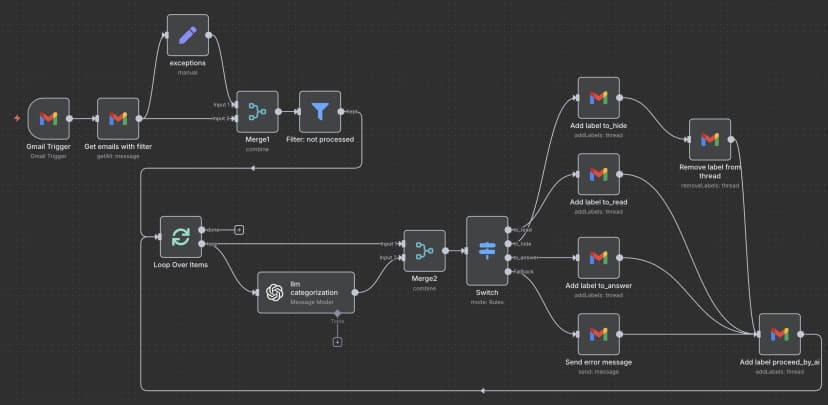
जैसे ही मेरे Gmail inbox में कोई नया email आता है, workflow trigger हो जाता है। यह email content उठाता है, categorization के लिए OpenAI को भेजता है, फिर सही Gmail label लगाता है और उन emails को archive कर देता है जिन्हें मेरी attention की ज़रूरत नहीं।
ज़रूरी n8n nodes
अपने workflow में आपको ये nodes चाहिए:
- Gmail Trigger - नए emails monitor करता है
- OpenAI Chat Model - email content को categorize करता है
- Gmail - labels apply करता है और emails archive करता है
- IF conditions - AI के decision के हिसाब से emails route करता है
असली magic OpenAI node configuration में होता है। मैं इसे इस तरह set करता हूं:
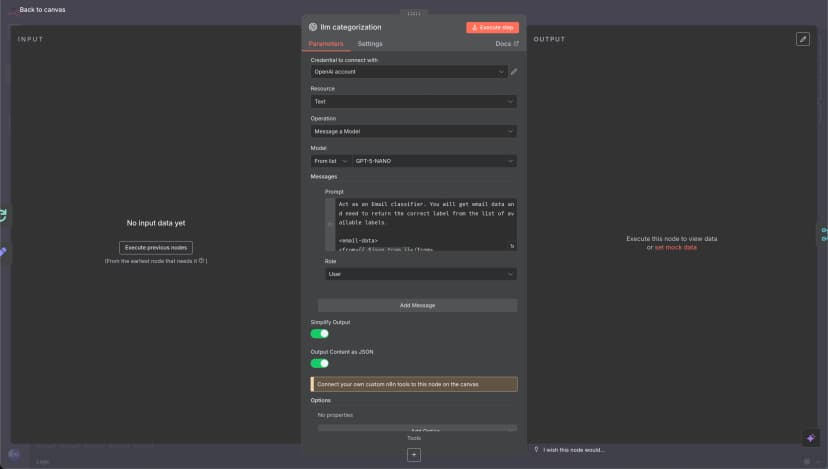
वह LLM prompt जो system को काम करवाता है
Prompt इस system का दिल है। Dozens of variations test करने के बाद, यही version मुझे सबसे consistent results देता है:
नोट: यह सिर्फ email categorization के लिए LLM prompt है। अगर आप complete n8n workflow automation देखना चाहते हैं, जिसमें सभी nodes और connections शामिल हों, तो नीचे "पूरा n8n Workflow JSON" section तक scroll करें।
पूरा LLM prompt देखने के लिए क्लिक करें
Act as an Email classifier. You will get email data and need to return the correct label from the list of available labels.

<email-data>
<from>{{ $json.From }}</from>
<to>{{ $json.To }}</to>
<email-subject>
{{ $json.Subject }}
</email-subject>
<email-snippet>
{{ $json.snippet }}
</email-snippet>
</email-data>

<possible-labels>

<to_read>
- `to_read` — for emails that need to be read by a human.
<to_read-examples>
- a secret code from the app/service
- notification about a message in another system, Kirill needs to log in and answer
- notification about something important Kirill needs to do
- notification from GitHub about a new message or issue in my project
</to_read-examples>
</to_read>

<to_hide>
- `to_hide` — for emails that are OK to be in the archive, but not needed to be read by a human right now.
<to_hide-examples>
- Invoices
- Some subscription for charity or news
- Product updates
- Advertising
- Proposals from companies without a history of our communications, but do not hide proposals from individuals
- Mentioning me in Discord or Slack (most likely spam and group mentions, or I will see it again in Slack, and no need to see here)
- Slack notification about new messages because Kirill will see them in Slack, no need to see them in email.
- Community summaries
- Some service incidents are mentioned, and an overview
- Notification about one more subscriber, because it does not need action from Kirill, and we can hide it.
- meeting notes from some AI software, because it is OK to have them in the archive, but Kirill doesn't need to reread them now.
</to_hide-examples>
</to_hide>

<to_answer>
- `to_answer` — for emails that need an answer.
<to_answer-examples>
- some emails with questions from a person or a company
</to_answer-examples>
<to_answer-bad-examples>
- message in external system, not in Gmail — bad example because Kirill can not answer via email. We need to mark these emails as to_read.
</to_answer-bad-examples>
</to_answer>

</possible-labels>

{{$node["exceptions"].json["additional-data-for-classify"]}}

Answer in JSON with two fields:
- `reasoning`
- `label`
मैं structured output इस्तेमाल करता हूं ताकि AI हमेशा valid category ही लौटाए। इससे न parsing errors आते हैं, न ऐसे edge cases जहां model response format में creativity दिखाने लगे।
तीन महीने के real-world results
इस system को implement करने के बाद:
- Time saved: email triage में लगभग 15-20 मिनट per day बचते हैं
- Accuracy: AI करीब 95% emails को सही तरह categorize करता है
- Cost: GPT-5-nano के साथ $3 per month से कम
- False positives: हफ्ते में शायद 2-3 emails गलत category में चले जाते हैं
5% error rate मेरे लिए बिल्कुल manageable है। जब AI गलत होता है, मैं बस email को सही category में move करता हूं और आगे बढ़ जाता हूं। फिर भी यह सब manually sort करने से काफी तेज़ है।
Security considerations (और मैं इससे क्यों ठीक हूं)
हां, OpenAI अब मेरे सभी personal emails process करता है। Privacy के हिसाब से यह perfect नहीं है, लेकिन मैंने कुछ वजहों से इसे accept कर लिया।
पहली बात, मैं पहले से password manager और 2FA codes इस्तेमाल करता हूं जो email पर depend नहीं करते, इसलिए email compromise catastrophic नहीं होगा। दूसरी बात, regular ChatGPT use की वजह से OpenAI को वैसे भी मेरे बारे में काफी कुछ पता है। तीसरी बात, मेरे personal workflow के लिए time savings इस privacy trade-off के लायक है।
अगर आप sensitive business emails handle कर रहे हैं, तो शायद OpenAI API के बजाय local LLM इस्तेमाल करना बेहतर हो। n8n setup वैसे का वैसा काम करेगा।
अपनी email automation कैसे शुरू करें
यह system आप इस तरह बना सकते हैं:
- n8n setup करें - self-hosted या n8n Cloud, दोनों चलेगा
- Gmail connect करें - अपने Gmail account को authenticate करना होगा
- OpenAI API access लें - account बनाएं और API key हासिल करें
- Workflow import करें - लोग चाहेंगे तो मैं JSON export share कर दूंगा
- Prompt customize करें - अपने email patterns के मुताबिक categories adjust करें
- कुछ emails से test करें - सब कुछ automate करने से पहले छोटे scale पर शुरू करें
अगर आप n8n से वाकिफ हैं तो पूरा setup लगभग 30 मिनट लेता है। अगर बिल्कुल शुरुआत से आ रहे हैं तो एक घंटा लग सकता है।
यह Gmail के built-in features से बेहतर क्यों है
Gmail की automatic categorization सबके लिए design की गई है, और इसी वजह से वह किसी एक व्यक्ति के लिए optimize नहीं होती। मेरा system मेरे specific email patterns और preferences को सीखता है।
और सबसे अच्छी बात, मैं जब चाहूं logic बदल सकता हूं। चौथी category चाहिए? Prompt बदल दीजिए। कुछ specific senders के emails को अलग handle करना है? एक condition node add कर दीजिए। Gmail के rules rigid होते हैं; यह system मेरी ज़रूरत के साथ adapt होता है।
निष्कर्ष
तीन महीने बाद, यह email automation system मेरे daily workflow का essential हिस्सा बन चुका है। यह perfect नहीं है, लेकिन हर हफ्ते hundreds of emails manually sort करने से बहुत बेहतर है।
Setup सीधा है, ongoing cost बहुत कम है, और time savings बिल्कुल real है। अगर आप भी मेरी तरह email में डूब रहे हैं, तो यह approach try करने लायक हो सकती है।
बस इतना याद रखें: simple से शुरू करें, अच्छी तरह test करें, और ऐसी कोई चीज automate मत करें जिसे आप आसानी से undo न कर सकें।
पूरा n8n Workflow JSON
Jo log is system ko turant implement karna chahte hain, unke liye yahan poora n8n workflow diya gaya hai jise aap seedha import kar sakte hain:
Pura JSON workflow dekhne ke liye click karen
{
"name": "email-ai-automation-personal",
"nodes": [
{
"parameters": {
"rules": {
"values": [
{
"conditions": {
"options": {
"caseSensitive": true,
"leftValue": "",
"typeValidation": "strict",
"version": 2
},
"conditions": [
{
"leftValue": "={{ $json.message.content.label }}",
"rightValue": "to_read",
"operator": {
"type": "string",
"operation": "equals"
},
"id": "585b8b65-2369-4f4e-ba0d-4a7dfc7cdef9"
}
],
"combinator": "and"
},
"renameOutput": true,
"outputKey": "to_read"
},
{
"conditions": {
"options": {
"caseSensitive": true,
"leftValue": "",
"typeValidation": "strict",
"version": 2
},
"conditions": [
{
"id": "99e46836-ea2f-41d7-8ebc-24bd5cfadd41",
"leftValue": "={{ $json.message.content.label }}",
"rightValue": "to_hide",
"operator": {
"type": "string",
"operation": "equals",
"name": "filter.operator.equals"
}
}
],
"combinator": "and"
},
"renameOutput": true,
"outputKey": "to_hide"
},
{
"conditions": {
"options": {
"caseSensitive": true,
"leftValue": "",
"typeValidation": "strict",
"version": 2
},
"conditions": [
{
"id": "2a10fb26-99e6-43ab-854c-2d208f701ac3",
"leftValue": "={{ $json.message.content.label }}",
"rightValue": "to_answer",
"operator": {
"type": "string",
"operation": "equals",
"name": "filter.operator.equals"
}
}
],
"combinator": "and"
},
"renameOutput": true,
"outputKey": "to_answer"
}
]
},
"options": {
"fallbackOutput": "extra"
}
},
"type": "n8n-nodes-base.switch",
"typeVersion": 3.2,
"position": [
-1552,
432
],
"id": "ff266540-edd6-42ef-8e07-f1754c1aa394",
"name": "Switch"
},
{
"parameters": {
"options": {}
},
"type": "n8n-nodes-base.splitInBatches",
"typeVersion": 3,
"position": [
-2256,
432
],
"id": "66a72457-b0e5-4ab0-bf49-ef00a06213aa",
"name": "Loop Over Items"
},
{
"parameters": {
"resource": "thread",
"operation": "addLabels",
"threadId": "={{ $json.threadId }}",
"labelIds": []
},
"type": "n8n-nodes-base.gmail",
"typeVersion": 2.1,
"position": [
-1296,
112
],
"id": "47db305c-2f55-4797-b646-331903a798ad",
"name": "Add label to_hide",
"webhookId": "",
"credentials": {}
},
{
"parameters": {
"resource": "thread",
"operation": "addLabels",
"threadId": "={{ $json.threadId }}",
"labelIds": []
},
"type": "n8n-nodes-base.gmail",
"typeVersion": 2.1,
"position": [
-1296,
480
],
"id": "bb1c5387-99a2-42ba-b615-ae65f39e9337",
"name": "Add label to_answer",
"webhookId": "",
"credentials": {}
},
{
"parameters": {
"resource": "thread",
"operation": "addLabels",
"threadId": "={{ $json.threadId }}",
"labelIds": []
},
"type": "n8n-nodes-base.gmail",
"typeVersion": 2.1,
"position": [
-1296,
288
],
"id": "82f68387-c342-4222-87c3-f6bbb1a23f77",
"name": "Add label to_read",
"webhookId": "",
"credentials": {}
},
{
"parameters": {
"resource": "thread",
"operation": "addLabels",
"threadId": "={{ $('Merge2').item.json.threadId }}",
"labelIds": []
},
"type": "n8n-nodes-base.gmail",
"typeVersion": 2.1,
"position": [
-880,
656
],
"id": "7de8f655-3c3d-49f9-9074-b39eaf4abaf2",
"name": "Add label processed_by_ai",
"webhookId": "",
"credentials": {}
},
{
"parameters": {
"resource": "thread",
"operation": "removeLabels",
"threadId": "={{ $('Merge2').item.json.threadId }}",
"labelIds": [
"INBOX"
]
},
"type": "n8n-nodes-base.gmail",
"typeVersion": 2.1,
"position": [
-1040,
208
],
"id": "438c1618-edf3-41a1-b991-fef18b003edf",
"name": "Remove label from thread",
"webhookId": "",
"credentials": {}
},
{
"parameters": {
"pollTimes": {
"item": [
{
"mode": "everyX"
}
]
},
"filters": {}
},
"type": "n8n-nodes-base.gmailTrigger",
"typeVersion": 1.2,
"position": [
-2560,
160
],
"id": "676e065d-fc0b-4ae4-8c1b-4b663267023f",
"name": "Gmail Trigger",
"credentials": {}
},
{
"parameters": {
"assignments": {
"assignments": [
{
"id": "be8e84b9-48af-4a49-b4f7-797382c13afe",
"name": "additional-data-for-classify",
"value": "<additional-data-for-classify>\n- All messages from Deel with the main idea, like `New contractor submission`, please mark as `to_hide`.\n</additional-data-for-classify>",
"type": "string"
}
]
},
"options": {}
},
"type": "n8n-nodes-base.set",
"typeVersion": 3.4,
"position": [
-2240,
-32
],
"id": "9cb4e14e-cd43-4a7b-96c9-7acd93b8b947",
"name": "exceptions"
},
{
"parameters": {
"modelId": {
"__rl": true,
"value": "gpt-5-mini",
"mode": "list",
"cachedResultName": "GPT-5-MINI"
},
"messages": {
"values": [
{
"content": "=Act as an Email classifier. You will get email data and need to return the correct label from the list of available labels.\n\n<email-data>\n<from>{{ $json.From }}</from>\n<to>{{ $json.To }}</to>\n<email-subject>\n{{ $json.Subject }}\n</email-subject>\n<email-snippet>\n{{ $json.snippet }}\n</email-snippet>\n</email-data>\n\n<possible-lables>\n\n<to_read>\n- `to_read` — for emails that need to be read by a human. \n<to_read-examples>\n- a secret code from the app/service\n- notification about a message in another system, Kirill needs to log in and answer\n- notification about something important Kirill needs to do\n- notification from GitHub about a new message or issue in my project\n</to_read-examples>\n</to_read>\n\n<to_hide>\n- `to_hide` — for emails that are OK to be in the archive, but not needed to be read by a human right now. \n<to_hide-examples> \n- Invoices \n- Some subscription for charity or news\n- Product uddates\n- Advertising\n- Proposals from companies without a history of our communications, but do not hide proposals from individuals\n- Mentioning me in Discord or Slack (most likely spam and group mentions, or I will see it again in Slack, and no need to see here)\n- Slack notification about new messages because Kirill will see them in Slack, no need to see them in email.\n- Community summaries\n- Some service incidents are mentioned, and an overview\n- Notification about one more subscriber, because it does not need action from Kirill, and we can hide it.\n- meeting notes from some AI software, because it is OK to have them in the archive, but Kirill doesn't need to reread them now.\n</to_hide-examples>\n</to_hide>\n\n<to_answer>\n- `to_answer` — for emails that need an answer.\n<to_answer-examples>\n- some emails with questions from a person or a company\n</to_answer-examples>\n<to_answer-bad-examples>\n- message in external system, not in Gmail — bad example because Kirill can not answer via email. We need to mark these emails as to_read.\n</to_answer-bad-examples>\n</to_answer>\n\n</possible-lables>\n\n{{$node[\"exceptions\"].json[\"additional-data-for-classify\"]}}\n\nAnswer in JSON with two fields:\n- `reasoning`\n- `label`"
}
]
},
"jsonOutput": true,
"options": {}
},
"type": "@n8n/n8n-nodes-langchain.openAi",
"typeVersion": 1.8,
"position": [
-2032,
560
],
"id": "4f65ce04-67eb-4c28-9d56-6d2f03dedd41",
"name": "llm categorization",
"alwaysOutputData": false,
"credentials": {}
},
{
"parameters": {
"conditions": {
"options": {
"caseSensitive": true,
"leftValue": "",
"typeValidation": "strict",
"version": 2
},
"conditions": [
{
"id": "95f8838a-df88-496c-a0ea-d19c612eb81b",
"leftValue": "={{ $json.labels.filter(item => item.id == \"__REPLACE_WITH_YOUR_PROCESSED_LABEL_ID__\") }}",
"rightValue": "={{ \"\" }}",
"operator": {
"type": "array",
"operation": "empty",
"singleValue": true
}
}
],
"combinator": "and"
},
"options": {}
},
"type": "n8n-nodes-base.filter",
"typeVersion": 2.2,
"position": [
-1936,
144
],
"id": "cc8dda5a-414c-4fb8-9774-6bdfe1224976",
"name": "Filter: not processed"
},
{
"parameters": {
"sendTo": "",
"subject": "There is a problem with AI email workflow — AI choose the wrong option",
"emailType": "text",
"message": "!",
"options": {}
},
"type": "n8n-nodes-base.gmail",
"typeVersion": 2.1,
"position": [
-1296,
656
],
"id": "90cfc5e9-cddd-418e-bf95-5e9eb77b6778",
"name": "Send error message",
"webhookId": "",
"credentials": {}
},
{
"parameters": {
"operation": "getAll",
"returnAll": true,
"filters": {
"q": "=label:INBOX -label:__REPLACE_WITH_YOUR_PROCESSED_LABEL_ID__ after:2025/06/15"
}
},
"type": "n8n-nodes-base.gmail",
"typeVersion": 2.1,
"position": [
-2400,
160
],
"id": "5d534d0c-0210-4d32-853d-d26a5b13c646",
"name": "Get emails with filter",
"webhookId": "",
"credentials": {}
},
{
"parameters": {
"mode": "combine",
"combineBy": "combineByPosition",
"options": {}
},
"type": "n8n-nodes-base.merge",
"typeVersion": 3.2,
"position": [
-2080,
144
],
"id": "c6e6b5bd-0196-4a4f-a36d-1f119df3ee5d",
"name": "Merge1"
},
{
"parameters": {
"mode": "combine",
"combineBy": "combineByPosition",
"options": {}
},
"type": "n8n-nodes-base.merge",
"typeVersion": 3.2,
"position": [
-1696,
464
],
"id": "d109e9f9-1089-4060-89e4-e70762d0aea5",
"name": "Merge2"
}
],
"pinData": {},
"connections": {
"Switch": {
"main": [
[
{
"node": "Add label to_read",
"type": "main",
"index": 0
}
],
[
{
"node": "Add label to_hide",
"type": "main",
"index": 0
}
],
[
{
"node": "Add label to_answer",
"type": "main",
"index": 0
}
],
[
{
"node": "Send error message",
"type": "main",
"index": 0
}
]
]
},
"Loop Over Items": {
"main": [
[],
[
{
"node": "llm categorization",
"type": "main",
"index": 0
},
{
"node": "Merge2",
"type": "main",
"index": 0
}
]
]
},
"Add label to_hide": {
"main": [
[
{
"node": "Remove label from thread",
"type": "main",
"index": 0
}
]
]
},
"Add label to_answer": {
"main": [
[
{
"node": "Add label processed_by_ai",
"type": "main",
"index": 0
}
]
]
},
"Add label to_read": {
"main": [
[
{
"node": "Add label processed_by_ai",
"type": "main",
"index": 0
}
]
]
},
"Add label processed_by_ai": {
"main": [
[
{
"node": "Loop Over Items",
"type": "main",
"index": 0
}
]
]
},
"Remove label from thread": {
"main": [
[
{
"node": "Add label processed_by_ai",
"type": "main",
"index": 0
}
]
]
},
"Gmail Trigger": {
"main": [
[
{
"node": "Get emails with filter",
"type": "main",
"index": 0
}
]
]
},
"exceptions": {
"main": [
[
{
"node": "Merge1",
"type": "main",
"index": 0
}
]
]
},
"llm categorization": {
"main": [
[
{
"node": "Merge2",
"type": "main",
"index": 1
}
]
]
},
"Filter: not processed": {
"main": [
[
{
"node": "Loop Over Items",
"type": "main",
"index": 0
}
]
]
},
"Send error message": {
"main": [
[
{
"node": "Add label processed_by_ai",
"type": "main",
"index": 0
}
]
]
},
"Get emails with filter": {
"main": [
[
{
"node": "exceptions",
"type": "main",
"index": 0
},
{
"node": "Merge1",
"type": "main",
"index": 1
}
]
]
},
"Merge1": {
"main": [
[
{
"node": "Filter: not processed",
"type": "main",
"index": 0
}
]
]
},
"Merge2": {
"main": [
[
{
"node": "Switch",
"type": "main",
"index": 0
}
]
]
}
},
"active": true,
"settings": {
"executionOrder": "v1",
"callerPolicy": "workflowsFromSameOwner"
},
"versionId": "",
"meta": {
"templateCredsSetupCompleted": true,
"instanceId": ""
},
"id": "",
"tags": []
}
Import instructions
- ऊपर दिया गया JSON copy करें
- इसे
email-ai-automation-personal.jsonनाम की file में save करें - n8n में Workflows → Import from JSON पर जाएं
- जो file save की थी उसे select करें और Import पर click करें
- अपने Gmail और OpenAI credentials configure करें
__REPLACE_WITH_YOUR_PROCESSED_LABEL_ID__को उस label ID से replace करें जो आप processed emails के लिए इस्तेमाल करना चाहते हैं- Error आने की स्थिति में भेजे जाने वाले email को setup करें (fallback)
- Trigger enable करने से पहले कुछ emails के साथ test करें
Import करने के बाद OpenAI API key और Gmail authentication को update करना याद रखें।
वीडियो ट्यूटोरियल: पूरा setup देखें
अगर आप visual तरीके से सीखना पसंद करते हैं, तो मैंने एक detailed video tutorial बनाया है जो इस पूरे system को setup करने की process दिखाता है:
Video में n8n workflow बनाना, OpenAI integration configure करना, Gmail connection setup करना और पूरी automation को test करना हर step पर दिखाया गया है। आप exact node configurations, LLM prompt का real use और system को real-time में emails categorize करते हुए देखेंगे।