




Mera Complete Notion Task Manager: Goals, Projects aur Daily Tasks ke liye ek hi database
Main 16 saal ki umr se perfect productivity system ke peeche bhaag raha hoon. Tab mere dad ne mujhe time management ki ek kitab di thi, aur anjaane me ek monster bana diya. Uske baad maine lagbhag har system try kiya: 12-week planning, monthly goals, bullet journal, aur endless apps.
Do saal pehle maine finally kuch aisa banaya jo tik gaya. Ye Notion ki ek single table hai jisme sab kuch aata hai: quarterly goals, random ideas, daily tasks, project plans. Sab kuch. Aur ajeeb baat ye hai ki hundreds of open items manage karne ke baad bhi main aksar inbox zero tak pahunch jata hoon.
Pichhle hafte mere siblings ne is system ko action me dekha aur bola ki ise document karo. Family tak rakhne ke bajay maine socha ise yahan share kar deta hoon. Ye koi aur “productivity hack” nahi hai. Ye ek battle-tested Notion task manager hai jo real life ke beech ek saal se zyada chal chuka hai.
Iske kaam karne ki wajah surprisingly simple hai: sab kuch ek hi database me rehta hai. Apps ke beech jump nahi karna, complex integrations nahi, aur life busy hote hi task avalanche nahi. Bas ek hierarchy jo life directions se daily action tak scale hoti hai, aur aisi views jo sirf wahi dikhati hain jo abhi dekhna zaroori hai.
Video tutorial pasand hai? Maine is complete system ka step-by-step video walkthrough banaya hai. Complete Notion Task Manager Guide dekhen aur poora workflow action me dekhen.
Problem aur solution: ek hi table kyon kaam karti hai
Maine productivity ke lagbhag har system ko test kiya: Todoist, Things, TickTick, Monday.com, Getting Things Done, bullet journaling. Sab aakhir me ek hi reason se fail hue: task avalanches.
Pattern hamesha same tha. Naya system shuru hota, main excited hota. Har cheez ko due date milti. “Quarterly report finish karo” March 15 tak. “Dentist ko call karo” Thursday tak. Har kaam ko date dena organized lagta tha.
Phir life beech me aa jati. Busy week, family emergency, ya kisi project me deep focus. Kuch din task manager kholna hi nahi hota.
Jab finally himmat karke check karta, to 50+ overdue items mujhe ghoorte milte. Red badges, angry notifications, aur tasks jo chillati lagti thi ki tum late ho. Psychological load bahut heavy lagta tha.
Sabse bura part task count nahi tha. Bura part ye tha ki mujhe pata hota tha ki inme se zyada tar “due dates” maine bas khud bana di thi. Kya mujhe sach me Thursday ko hi dentist ko call karna tha? Bilkul nahi. Lekin system bol raha tha ki main fail ho gaya.
Asli problem ye hai: artificial due dates artificial urgency banati hain, aur artificial urgency aapke dimaag ko task manager ignore karna sikhati hai.
Date-based systems un tasks ke liye kaam karti hain jinki real deadlines hoti hain, jaise bills ya reports. Lekin jab aap har task ko ek date-shaped box me bharne ki koshish karte ho, system toot jata hai. Zyada tar personal tasks ko kisi exact din nahi hona hota. Unhe bas aage badhna hota hai.
Notion solution: sab kuch ek table me
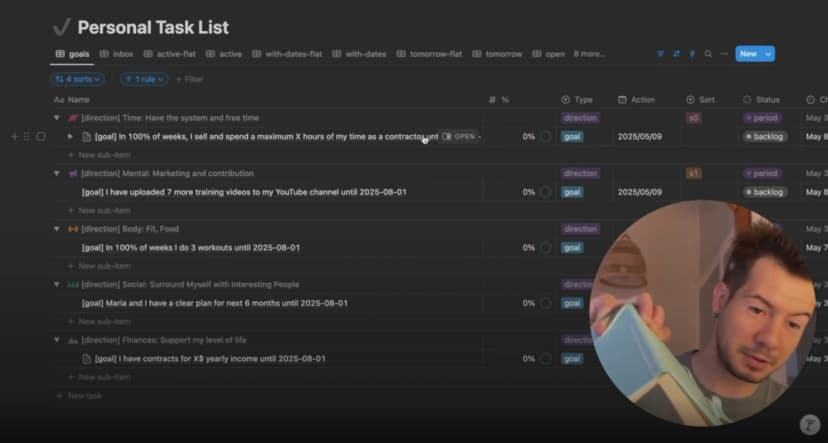
Breakthrough tab aaya jab maine alag-alag type ke kaam ko alag jagah organize karna band kar diya. Goals, tasks aur projects ko alag apps me rakhne ke bajay maine sab kuch ek single Notion task manager me daal diya. Life directions, quarterly goals, project ideas, daily tasks, random thoughts, sab ek hi table me.
Ye approach context switching ki problem ko solve karti hai, jo traditional systems me productivity ko slow karti hai.
Sunne me chaotic lagta hai, lekin use karne par nahi. Secret ye hai ki Notion aapko data ko jaise chahe structure karne deta hai, aur phir zarurat ke hisab se dekhne deta hai. Data wahi rehta hai, perspective badalta hai.
Multiple apps kyon fail hoti hain:
- Context switching momentum tod deti hai
- Information silos me chali jati hai
- Systems dheere-dheere drift karte hain
Mera Notion solution: sab kuch ek hi database me rehta hai, bas Type fields alag hoti hain. Quarterly goal ka Type = "Goal" hota hai. Daily task ka Type = "Task". Life direction ka Type = "Direction". Same table, alag labels.
Jab sab kuch ek hi database me hota hai to parent-child relationships banana possible ho jata hai. Tasks projects ke andar hoti hain. Projects goals ko support karte hain. Goals life directions ko serve karte hain. Ye hierarchy real work flow ko better reflect karti hai.
Hundreds of tasks ke saath bhi ye kaise scale karta hai: main kabhi ek saath sab nahi dekhta. Smart views sirf wahi slice dikhati hain jo abhi relevant hai. Hierarchy natural boundaries banati hai. Har project me 5-15 tasks hoti hain. Har life direction me 3-5 projects. Numbers manageable rehte hain.
Sort positions due dates ki jagah leti hain. Har parent ke andar main items ko S0 se S4 tak rank karta hoon. S0 highest, S4 lowest. Isliye kisi project ko dekhte waqt mujhe clear order me kuch tasks dikhti hain, random pile nahi.
Ye system isliye scale karta hai kyunki ye dimaag ke kaam karne ke tareeke se match karta hai. Aap ek saath har task ke baare me nahi sochte. Aap current project, aaj ki priorities, ya is quarter ke goals ke baare me sochte ho.
Apna Notion task management system set up karna
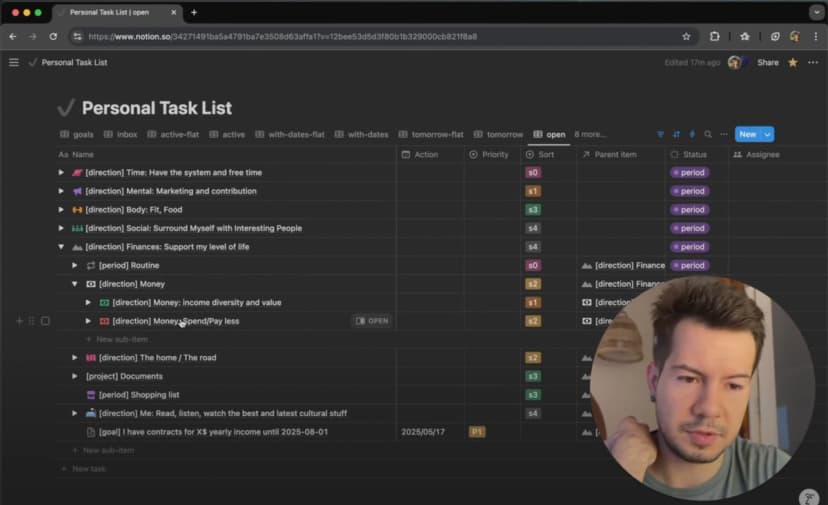
Foundation ek flexible hierarchy hai jahan bade containers chhote items ko hold karte hain. Aap ise roughly Life Directions → Goals → Projects → Tasks ki tarah dekh sakte hain, lekin ye koi rigid rule nahi hai.
Magic is baat me hai ki ye hierarchy ek hi Notion database me रहती hai aur parent-child relationships se connected hoti hai. Jaise “YouTube video record karna” task, “YouTube channel growth” project ka part ho sakta hai, jo “7 training videos upload karna” goal ko support kare, jo “Mental: continuous learning” life direction ko serve kare.
Jab sab kuch is tarah connected hota hai to aap kabhi nahi bhoolte ki aap jo kar rahe ho, woh kyon kar rahe ho.
Life directions aur quarterly goals
Life Directions foundation hain. Main Sahil Bloom ki “5 Types of Wealth” se inspired paanch ongoing areas use karta hoon:
Time: system aur free time
Mental: continuous learning aur growth
Body: physical health aur energy
Social: relationships aur community
Finances: meri desired life level ko support karna
Har direction ka apna emoji aur color tag hota hai. Main database me har direction ke liye ek entry banata hoon jiska Type = "Direction" hota hai. Ye sabke parent containers ban jate hain.
Quarterly Goals: har life direction ke liye ek major goal. Paanch goals nahi, ek specific aur measurable target. Example: “7 training videos upload karna”, “har week 3 workouts”, ya “weekly work hours ko X ke niche rakhna”.
Har goal ka Type = "Goal" hota hai, woh apni life direction ke niche aata hai, aur usme ek Progress field hoti hai jise main weekly update karta hoon using 8% system.
Parent-child task relationships
Is hierarchical approach ki asli power parent-child relationships se aati hai jo सात levels tak ja sakti hain. Har task, project aur goal ka ek clear place hota hai, aur kuch bhi isolated nahi hota.
Rough hierarchy kuch is tarah lag sakti hai:
Life Directions: Time, Mental, Body, Social, Finances
Quarterly Goals: har direction ke liye ek major target
Projects: jo bhi un goals ko support kare
Tasks: actual work
Subtasks: jab ek task abhi bhi bahut badi ho
Jaise mere YouTube goal ke niche “Training Video Production”, “Channel Analytics Review”, aur “Equipment Upgrades” jaise projects hain. “Training Video Production” ke niche “Cursor IDE Series” aur “Notion Productivity Series” jaise groups hain. Aur unke niche actual tasks aati hain.
Notion ki relation property is system ko chalati hai. Har database entry me ek Parent field hoti hai jo same database ki kisi aur entry se linked hoti hai. Isse bina alag tables ya complicated formulas ke tree structure ban jata hai.
Sort positions har parent ke andar priority control karti hain. Jab main YouTube project dekhता hoon to tasks clear order me hoti hain, random sequence me nahi.
Hierarchy har task ko context deti hai. “Record setup walkthrough” dekhte hi main samajh sakta hoon ki ye “Cursor IDE Series” ka hissa hai, jo “Training Video Production” ko support karti hai, jo “7 training videos upload karna” goal ko feed karti hai, jo meri “Mental” direction ko serve karta hai.
Notion me core database structure set up karna
Ye system simple database par chalta hai jisme aath essential properties hoti hain:
Parent (Relation): hierarchy banane ke liye
Type (Select): Direction, Goal, Task
Status (Select): Active, Complete, Periodic
Sort Position (Select): S0-S4
Action Date (Date): sirf real deadlines ke liye
Priority (Select): P0-P4
Progress (Number): quarterly goals ke liye
Size (Select): complexity estimate
Different entry types in properties ka alag combination use karte hain. Directions ko sirf Type aur Sort Position chahiye ho sakta hai. Goals ko Parent aur Progress chahiye. Tasks shayad sab use karein.
Type aur Status configuration
Type field ek table me sab kuch organize karne me help karti hai:
- Direction: life areas
- Goal: quarterly targets
- Task: baki sab kuch, including projects, tasks, ideas, recurring items
Status field ke teen states hain:
- Active: abhi relevant items
- Complete: finished items
- Periodic: recurring tasks jo complete nahi hoti, aage cycle hoti hain
Priority vs Sort Position
Sort Position (S0-S4) almost hamesha filled hota hai aur parent ke andar order control karta hai.
Priority (P0-P4) mostly empty hota hai aur sirf tab fill hota hai jab ek hi din me multiple tasks compete kar rahi hoti hain.
Key insight: maine date-driven task management se sort-driven management ki taraf shift kiya. Pehle main choose karta tha ki task kab karni hai. Ab main choose karta hoon ki project ke andar uska order kya hai.
Sort Position = “ye project me kahan fit hoti hai?”
Priority = “aaj sabse pehle kya karna hai?”
Action Date ka setup
Main action dates ko avoid karta hoon jab tak wo genuinely zaroori na ho. Sirf in cases me assign karta hoon:
- Real external deadlines
- Periodic maintenance tasks
- Specific daily commitments
Baki tasks bina date ke hierarchy me rehti hain. Ek daily automation overdue tasks ko aaj ki date par le aati hai taaki guilt-inducing buildup na ho.
S0-S4 sort position system
Ye system tasks ko sirf apne siblings ke relative rank karta hai:
S0: critical path items
S1: project success ke liye important
S2: normal priority
S3: nice to have
S4: someday/maybe ideas
Ye naturally scale karta hai. Project me 5 tasks ho ya 50, main bas itna decide karta hoon: “is project ki baki tasks ke comparison me ye kitni important hai?”
Status, Progress aur Size
Status individual tasks ko handle karta hai: Active items working views me aati hain, Complete hidden rehti hain, Periodic items cycle hoti rehti hain.
Progress quarterly goals ko weekly 8% increments me track karta hai. Har Friday main actual advancement ke hisab se update karta hoon.
Size complexity estimate karta hai:
- Moment/Small: quick tasks
- Medium/Big: multi-session work
- sshshshshshsh: woh kaam jo main bilkul nahi karna chahta
Mera daily workflow: overwhelm ke bina inbox zero
Main roz 10-20 naye tasks add karta hoon aur phir bhi aksar inbox zero tak pahunch jata hoon. Secret ye hai ki capturing aur processing alag workflows hain. Capture thoughtless hoti hai. Processing intentional hoti hai.
Quick task capture
Is workflow me sirf do clicks lagte hain. Capture aur organization alag mental modes hain. Capture ke waqt main bas thought ko dimaag se nikalna chahta hoon.
Setup:
- Phone: Notion widget + Siri shortcuts
- Computer: database ki “Add New” view wali pinned tab
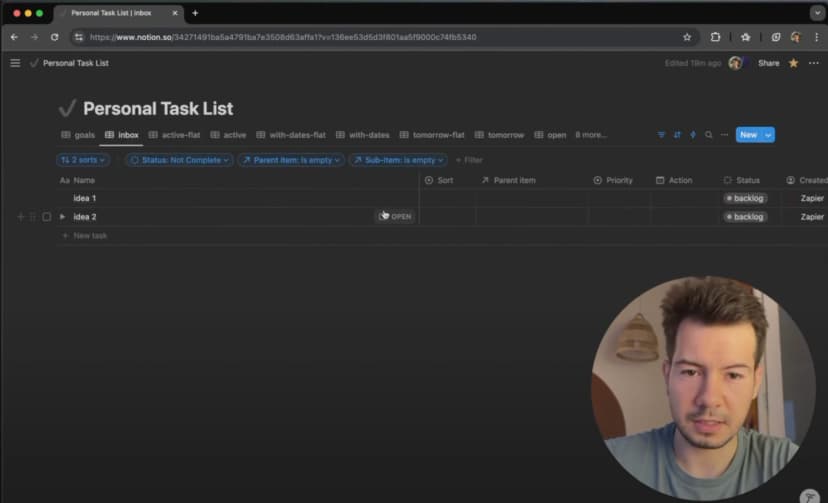
Har idea seedha inbox me jata hai, sirf title ke saath. No parent, no priority, no date.
Daily inbox processing
Inbox process karne me 10-15 minutes lagte hain. Har item ke liye main Jobs to Be Done framework ke saath teen sawal puchta hoon:
1. Ye kis life direction me aata hai?
2. Kya ise aur break down karna hai?
3. Similar tasks ke comparison me iski priority kya hai?
Processing ke dauran main almost kabhi action dates assign nahi karta.
Main due dates se kyon bachta hoon
Due dates se bachne ka reason simple hai: artificial urgency system ko ignore karna sikhati hai. “LinkedIn update karna” ya “Spanish seekhna” jaisi tasks ke paas real deadline nahi hoti. Arbitrary date dena bas guilt create karta hai.
Main dates sirf in cheezon ko deta hoon:
- Real external deadlines
- Periodic maintenance
- Deliberate daily planning commitments
Baki sab hierarchy me sort position ke saath rehta hai. Isi liye 50 overdue items wali avalanche nahi aati.
Weekly cleanup me main action dates scan karke puchta hoon: “kya isse sach me specific date chahiye?” Aksar jawab nahi hota. Dated tasks usually 3-7 hoti hain aur wahi meri minimum obligations ban jati hain.
Essential views jo system ko manageable banati hain
Main kabhi ek saath hundreds of tasks nahi dekhta. Smart database views same data ko alag purposes ke liye filter karti hain: daily execution, tomorrow planning, inbox processing, goal tracking aur project work.
Active Tasks view
Mera daily command center sirf woh tasks dikhata hai jinko aaj attention chahiye.
Filters:
- Status: Active
- Action Date: today ya earlier
Tree view vs flat view
Tree View: hierarchy aur context dikhata hai.
Flat View: simple checklist.
Strategy ke liye tree view. Execution ke liye flat view.
Tomorrow planning view
Din ke end par main 3-7 tasks ko kal ke liye promote karta hoon.
Same filters wali do views:
- Status: Active
- Action Date: Tomorrow
Tomorrow (Tree): evening planning ke liye
Tomorrow Flat: morning execution ke liye
Next day priorities
Evening planning ke waqt main tomorrow tasks ko Priority (P0-P4) deta hoon:
P0: sabse pehle hona hi chahiye
P1: jaldi hona chahiye
P2: normal
P3: agar time mila
P4: last resort
Inbox view
Inbox view raw brain dump ko hold karti hai aur main ise roz zero karta hoon.
Filter: Parent empty hai
Jis item ka parent nahi hai, usse process karna hai. Parent assign hote hi wo sahi project view me chali jati hai.
Extra filter while processing: Created: past week
Jobs to Be Done approach
Maine JTBD ko inbox processing ke liye adapt kiya: “Main is task ko apni life me kaunsa kaam karne ke liye hire kar raha hoon?” Isse focus “ye kahan jayegi?” se “ye kaunsa outcome create karegi?” par shift hota hai.
Parent tasks aur sort positions assign karna
Processing ke waqt main deliberate decisions leta hoon ki item bade goals aur projects me kaise fit hoti hai. Har task kisi bade purpose ko serve karti hai.
Ye kis life direction me jati hai?
Time, Mental, Body, Social, ya Finances. 90% tasks ka obvious home hota hai.
Kya ise aur break down karna hai?
System ki khoobsurti ye hai ki aapko ye decide karne ki zarurat nahi ki ye “task” hai ya “project”. Bas itna decide karo ki kya is item ko chhote parts me todna hai.
Parent ke andar priority
Final step hai siblings ke relative S0-S4 assign karna:
S0: critical path
S1-S2: core work
S3-S4: nice to have / someday maybe
Chaar key questions
Har new task ke liye 15-30 seconds ka quick evaluation:
1. Ye task kaunsa kaam karegi?
2. Ye kaunsi life direction ko serve karti hai?
3. Kya ye ek item hai ya ise break down karna chahiye?
4. Same area ki dusri cheezon ke comparison me kitni important hai?
Weekly goal reviews
Weekly reviews quarterly goals ko wishful thinking se actual progress me badal deti hain. Bina regular check-ins ke goals bas resolutions ban kar reh jate hain. Regular reviews ke saath wo living commitments ban jati hain.
8% weekly progress system
Simple math: 12 weeks per quarter = lagbhag 8% per week. Har Friday main puchta hoon “kya maine is week meaningful progress ki?” aur Progress update karta hoon.

Ye approach The 12 Week Year se inspired hai. Iska core idea hai ki chhote execution cycles natural urgency create karte hain.
Power perfect measurement me nahi, regular accountability me hai. Week 8 me 30% progress clearly problem dikhati hai.
Goal completion tracking
Goals same database structure use karti hain:
Progress Field: weekly updated percentage
Target Date: quarter end date
Parent Relationship: har goal ek life direction ke niche
Main ek goal progress dashboard aur weekly review template bhi use karta hoon.
Ye system traditional task managers se better kyon hai
Traditional task managers do flawed assumptions par chalti hain: sab tasks ko equally treat karo, aur sabko schedule kar do. Mera Notion system dono assumptions ko reverse karta hai.
No more task avalanches
Dates yahan exception hain. Zyada tar tasks bina action date ke rehti hain aur sort position se organize hoti hain.
Flexible hierarchy rigid categories ko replace karti hai. Parent-child relationships understanding ke saath evolve ho sakti hain.
Sort positions arbitrary deadlines ko replace karti hain.
System aapke hisab se adapt karta hai.
Context aur hierarchy ka difference
Traditional task managers tasks ko isolated items ke tarah treat karte hain. Lekin tasks projects ka part hoti hain, projects goals ko support karte hain, aur goals life directions ko serve karte hain.
Context “kyon” ka jawab deta hai. “Video intro record karna” akela ek checkbox hai. Lekin jab woh “Cursor IDE Series” → “Training Video Production” → “Upload 7 training videos” → “Mental growth” se linked ho, to uska purpose clear hota hai.
Key benefits:
- Connection ke through motivation
- Smart substitution
- Natural priority evaluation
- Flexible focus
Traditional managers task completion optimize karti hain. Ye system outcome achievement optimize karta hai.
Video tutorial
Agar aap visually seekhna pasand karte hain, to maine poore system ka detailed video tutorial banaya hai:

Video me har component real time me dikhaya gaya hai: database structure set up karna, essential views banana, daily workflow chalana, inbox process karna, aur system ko long term tak maintain karna.