I have only been using Codex seriously for about a month, mostly after GPT-5.4 made it feel much more usable to me. So this is not a "five years of battle-tested wisdom" article. It is a much simpler observation: Codex got good for me the moment I stopped treating it like another fancy prompt box and started giving it stable instructions up front.
OpenAI has both Codex CLI and the Mac app. Both work with the same general idea for me: persistent instructions, AGENTS.md, repo rules, and an agent that starts with my development patterns already loaded. I prefer the Mac app because it is simply much nicer to live in than another terminal window.
Codex CLI already does this part well. The Mac app gives me a prettier and more pleasant shell around the same underlying Codex workflow. I still care about the same persistent development patterns. Strict typing, minimal diffs, explicit errors, no random fallbacks, docstrings in code instead of scattered explanations. I do not want to teach Codex that from scratch in every new task. I want that baseline there from the start.
In practice, that lives in Settings -> Personalization -> Custom instructions.
Under the hood, those app instructions map to personal AGENTS.md. Good. I get the nicer app experience without losing the CLI-style clarity of a real file.
Where Codex Custom Instructions Actually Live
If you only remember one screen from this article, make it this one.
In the app, global instructions live under Settings -> Personalization -> Custom instructions. I would show that screen first.
OpenAI's Codex docs say Codex can read a global instruction file from your Codex home directory, usually ~/.codex/AGENTS.md. The Codex settings docs also say that editing custom instructions updates your personal instructions in AGENTS.md.
That is exactly the model I want. I can use the app as the main interface without losing the clarity of a file behind it.
So my mental model looks like this:
- Personal
~/.codex/AGENTS.mdfor my cross-project defaults - Repository
AGENTS.mdfor team and repo guidance - Codex app settings and repository guidance around those rules
Here is the screen:
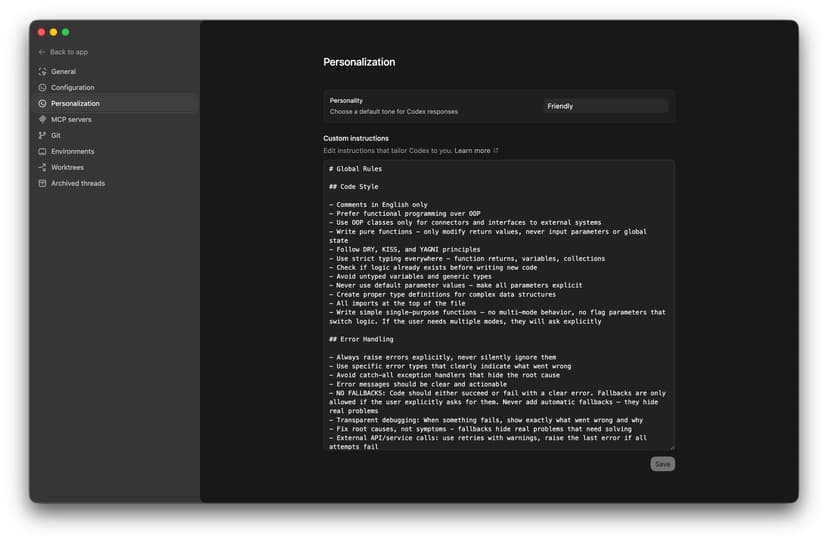
The Codex Rules I Actually Want Loaded Everywhere
This is the baseline I want Codex to bring into any repository before it sees project-specific instructions.
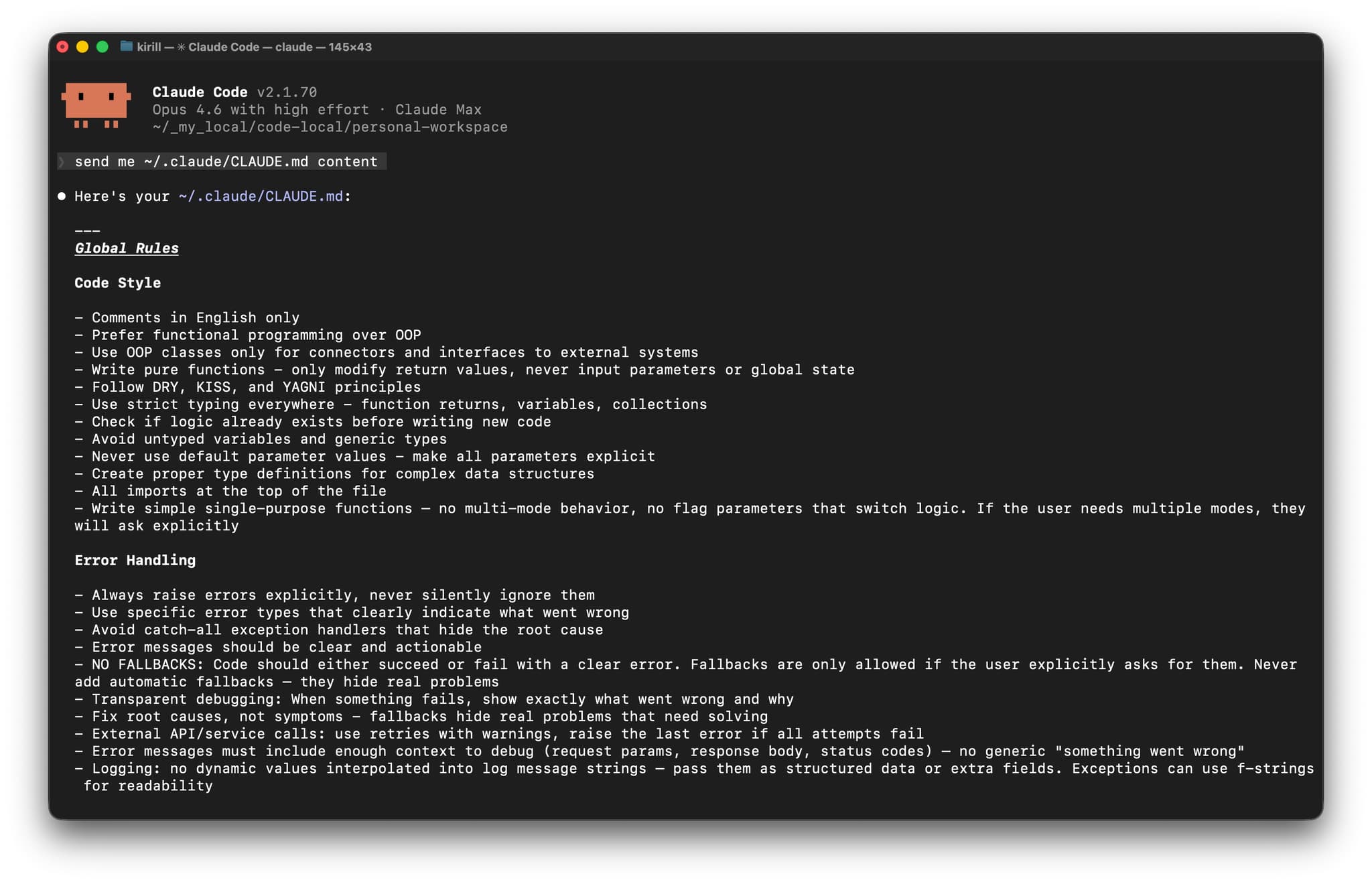
# Global Rules

## Code Style

- Comments in English only
- Prefer functional programming over OOP
- Use OOP classes only for connectors and interfaces to external systems
- Write pure functions - only modify return values, never input parameters or global state
- Follow DRY, KISS, and YAGNI principles
- Prefer simple, native, vendor-recommended solutions and avoid premature abstractions
- Use strict typing for returns, variables, collections, and complex data; validate external/API data at runtime; require needed fields, ignore unrelated extra fields, prefer structured models over loose dictionaries, and avoid weak generic types like `Any`, `unknown`, or `List[Dict[str, Any]]`
- Check if logic already exists before writing new code
- Never use default parameter values - make all parameters explicit
- Write simple single-purpose functions - no multi-mode behavior, no flag parameters that switch logic. If the user needs multiple modes, they will ask explicitly

## Error Handling

- Always raise errors explicitly, never silently ignore them
- Use specific error types that clearly indicate what went wrong
- Avoid catch-all exception handlers that hide the root cause
- No fallbacks, symptom-masking guards, or silent recovery unless I explicitly ask for them; fix root causes and make code either succeed or fail with a clear error
- External API or service calls: use retries with warnings, then raise the last error
- Error messages must be clear, actionable, and specific: explain what failed and why, include request params, response body, status codes, and avoid generic "something went wrong"
- Logging should use structured fields instead of interpolating dynamic values into message strings

## Libraries and Dependencies

- Use modern stable, project-compatible package management, libraries, and language standards; prefer vendor-recommended patterns such as ESM when supported
- Install dependencies in project environments, not globally
- Add or update dependencies in project config files, not as one-off manual installs
- If a dependency is installed locally, read its source code when needed instead of guessing, even if it is gitignored

## Testing

- Respect the repository test strategy and add only the minimum useful tests for the requested change
- Prefer smoke, integration, and end-to-end tests over narrow unit or regression tests; do not test static text, prompts, or config unless behavior depends on them
- Do not create fake/mock-based tests by default; use real integrations when practical, even if they cost a little money
- UI tests and automations must use stable IDs, test IDs, or accessibility IDs instead of visible text, and fail fast without fallback clicks

## Terminal Usage

- Prefer non-interactive commands with flags over interactive ones
- Always use non-interactive git diff: `git --no-pager diff` or `git diff | cat`

## Workflow

- Read the existing code and relevant project instructions before editing
- Keep changes minimal and tightly scoped to the current request: make the smallest useful diff, change only the lines needed to solve the problem, and avoid unrelated improvements unless the user asks for them
- Match the existing style of the repository even if it differs from my personal preference; new code must look like it was written by the same author
- Keep files small and cohesive; split by feature or responsibility when the project has no established structure
- Do not revert unrelated changes
- If you are unsure, inspect the codebase instead of inventing patterns
- When project instructions include test or lint commands, run them before finishing if the task changed code

## Documentation

- Code is the primary documentation - use clear naming, types, and docstrings
- Keep documentation in docstrings of the functions, classes, or modules they describe, not in separate files
- Separate docs files only when a concept cannot be expressed clearly in code, and only one file per topic
- Never duplicate documentation across files; reference other sources instead
- Store knowledge as current state, not as a changelog of modifications

## Commits

- Never create a git commit unless the user explicitly asks for one
- Prefer `git merge` over `git squash` whenever possible, unless the user explicitly asks for squash.
- Uncommitted changes are the user's review state - they read the diff before deciding what to commit
- Keep changes uncommitted until asked, so the diff stays clean and reviewable
This file is boring in the best possible way.
It exists to remove repeated friction:
- Codex inventing broad refactors when I wanted a minimal patch
- Codex hiding uncertainty behind soft language
- Codex adding fallback behavior "for safety"
- Codex skipping over repository conventions because the prompt was too narrow
Once these rules are loaded, the session gets much calmer.
Why I Put Global Rules Above Repository Rules
Codex has good support for AGENTS.md layering. OpenAI documents a global file in ~/.codex/AGENTS.md, then repo and nested directory files as the working directory gets more specific.
That layering is useful, but the first layer still has to be mine.
My personal file should answer:
- how strict I want the coding style to be
- what I consider acceptable error handling
- how aggressive the agent should be with changes
- what "done" means in normal coding work
The repository file should answer:
- how this codebase is organized
- which commands to run
- which parts are fragile
- how the team wants PRs, commits, or docs handled
Short version:
- personal
AGENTS.mdsays how I work - repository
AGENTS.mdsays how this codebase works
If I mix those together, I get duplication, drift, and a file nobody wants to maintain.
This is one reason Codex works better for me than I expected. The instruction hierarchy is explicit. It feels less like hidden prompt games and more like an actual system.
The Mac App Is the Main Surface, and That Matters
The new Codex Mac app is the part I enjoy most right now.
That is not because the CLI is weak. The CLI is already very good. The app is just much nicer to live in day to day. Same Codex underneath, much more pleasant surface on top.
That is why I am not centering this article on the CLI even though the CLI matters. The app is the nicer way to use the same system.
What makes the app solid rather than cosmetic is that the instructions are still backed by AGENTS.md. The app docs say that editing custom instructions updates personal instructions in AGENTS.md, which is exactly the relationship I want:
- app settings for convenience
- file-based instructions for durability
That also makes CLI usage easy to reason about later, because the same base instructions carry over.
Project AGENTS.md Still Matters, Just Not as the Main Character
I do not want this article to turn into an AGENTS.md nesting tutorial, even though Codex supports that just fine.
My version is simpler:
- personal
AGENTS.mdgives Codex my baseline behavior - repository
AGENTS.mdgives Codex repo-specific expectations - nested files are for the rare spots that genuinely need them
That keeps the system understandable.
If I open a random repository and Codex behaves badly, I want to debug it fast. Usually the answer should be one of these:
- my global rules are unclear
- the repo instructions are missing
- the task itself is too broad
Not "I forgot which of seven hidden instruction layers won this prompt roulette."
Where the CLI Fits Into My Codex Setup
The Mac app is my main surface. The CLI is not some second-class fallback. It is the same Codex system in a different posture.
The CLI still matters for a few reasons:
- it makes the file-based configuration very obvious
- it is easier to inspect or script exact behavior
I do not want a separate worldview for the CLI. I want the same personal AGENTS.md, the same repo guidance, and the same guardrails across both.
That continuity is a big part of why the product feels coherent.
My Practical Codex Setup Right Now
If I were setting this up from scratch on a Mac today, I would do it in this order.
1. Write Personal Instructions First in the App
Open the Codex app settings with Cmd+,, go to Personalization, and write the custom instructions there first. I still think in terms of ~/.codex/AGENTS.md, but the app is the main place where I set this up and review it.
2. Keep the Personal File Short and Opinionated
Project architecture does not belong here. Durable coding rules do:
- strict typing
- explicit errors
- no silent fallbacks
- minimal diffs
- docstrings instead of scattered docs
- clean terminal habits
3. Add Repository AGENTS.md Only for Repo Truth
Commands, architecture, constraints, testing expectations, naming, dangerous areas. That is the repo layer.
Why Codex Feels Promising to Me Right Now
I am still early with Codex, so I am not going to oversell it.
But the combination is already strong:
- a real file-based instruction layer
- app and CLI that feel connected instead of contradictory
That is enough for me to keep using it.
The setup that works best so far is also the least glamorous one: write solid persistent instructions, keep repo guidance separate, and let the agent start from a baseline that already matches how you work.
Same pattern as Cursor. Same pattern as Claude Code. Different product, same lesson: the session goes better when the agent stops guessing who you are.
If you want the companion articles, they live here:
- Cursor IDE Rules for AI: https://kirill-markin.com/articles/cursor-ide-rules-for-ai/
- Claude Code Rules for AI: https://kirill-markin.com/articles/claude-code-rules-for-ai/